AI Tool to Write LinkedIn Articles for SEO
Published · Updated · By the RankedIn team
If you want an AI tool to write LinkedIn articles for SEO, look for one that does more than produce text. It should read what already ranks on Google for your exact search term, write a full LinkedIn article (not a feed post) that covers what those pages miss, check its own facts, and then help you post the article and get it indexed.
Most tools cover one or two of those jobs. Below we walk through the whole process with RankedIn, our own tool, as the worked example, using real numbers from a run on 23 October 2026. Then we give you a checklist to judge any tool, ours included. One honest note first: no tool can guarantee a Google ranking or indexing.
Why a LinkedIn article, not a LinkedIn post, is the SEO play
LinkedIn has two very different formats. A feed post is short, lives in the feed and is built for engagement: a strong first line before the "see more" cut, short paragraphs, a question that invites comments. Most pages about AI writing for LinkedIn, such as the guides from Ciela and Influencer AI Agents, are about this format.
A LinkedIn article is a full page with its own title, headings and a linkedin.com/pulse address. That makes it a page Google can crawl, index and show in its results, much like a blog post. If your goal is search traffic, the article is the format to write. We compare the formats in more detail in our guide to posts, articles and newsletters in Google.
Do LinkedIn articles actually rank? In our own keyword research (23 October 2026, Google United States, 17 searches about ranking or indexing LinkedIn articles), a linkedin.com/pulse article was in the live top 10 for 13 of the 17 searches. One was at number 1 for 4 of them, and all four were held by the same article, "Does Google index LinkedIn articles?" by Look Left Marketing. That is a small, topic-specific sample, not proof for every subject, but it shows the format can compete. The full evidence is in do LinkedIn articles rank on Google.
Set your expectations honestly: ranking takes time, it depends on the competition for your term, and nobody can promise it.
Can you use AI for SEO writing, and is SEO dead or evolving?
Yes, you can use AI for SEO. Google says it rewards helpful content however it is produced, as the Autoblogging.ai guide summarises it, and The AI Marketing Agency points to Google's guidance on helpful, people-first content: the origin of the content matters less than whether it genuinely helps a reader. What fails is thin, unedited output that does not answer the search.
Sources do not fully agree on the risk. Linkody's guide warns that AI content can lack originality, can invent facts ("hallucinate") and can fall short of Google's emphasis on real experience in its E-E-A-T guidelines. Both views lead to the same practice: give the AI real research, check the facts, and add first-hand detail yourself.
Is SEO dead in 2026? Several SEO tools now track whether content appears in AI answers such as Google's AI Overviews, alongside classic rankings. The basics they list still hold: match search intent, cover the topic fully, stay accurate and publish consistently.
What an AI tool must do for an SEO LinkedIn article
Writing is only one step. An article that can rank involves seven jobs:
- Read the live Google results for your exact term.
- Find the gaps those pages miss and the questions people ask.
- Write a full article aimed at the search term, at a sensible length.
- Check its factual claims against sources.
- Get it into LinkedIn's article editor cleanly.
- Get the published link indexed by Google.
- Check where the article shows up on Google over time.
A general chatbot like Claude or ChatGPT can write well, but you would do the research, structure, fact checks, posting, indexing and tracking yourself. Feed-post tools such as Taplio are built around posts, analytics and scheduling: the LinkedIn side, rather than Google search. SEO writing tools such as Surfer, Frase or Autoblogging.ai focus on search research and on pages for your own website, not on LinkedIn articles. That is the gap RankedIn was built for.
Step 1: Choose a long-tail search term and a country
Start with one specific search term that a real person types, plus the Google country you want to rank in. Long-tail terms (longer, more specific phrases) are realistic targets because fewer pages compete for them and the searcher's intent is clear.
Do not be put off by small numbers. In our research, most searches about ranking or indexing LinkedIn articles had about 10 searches a month; "linkedin article writer" had about 260. Small, specific terms are where a single article can realistically compete.
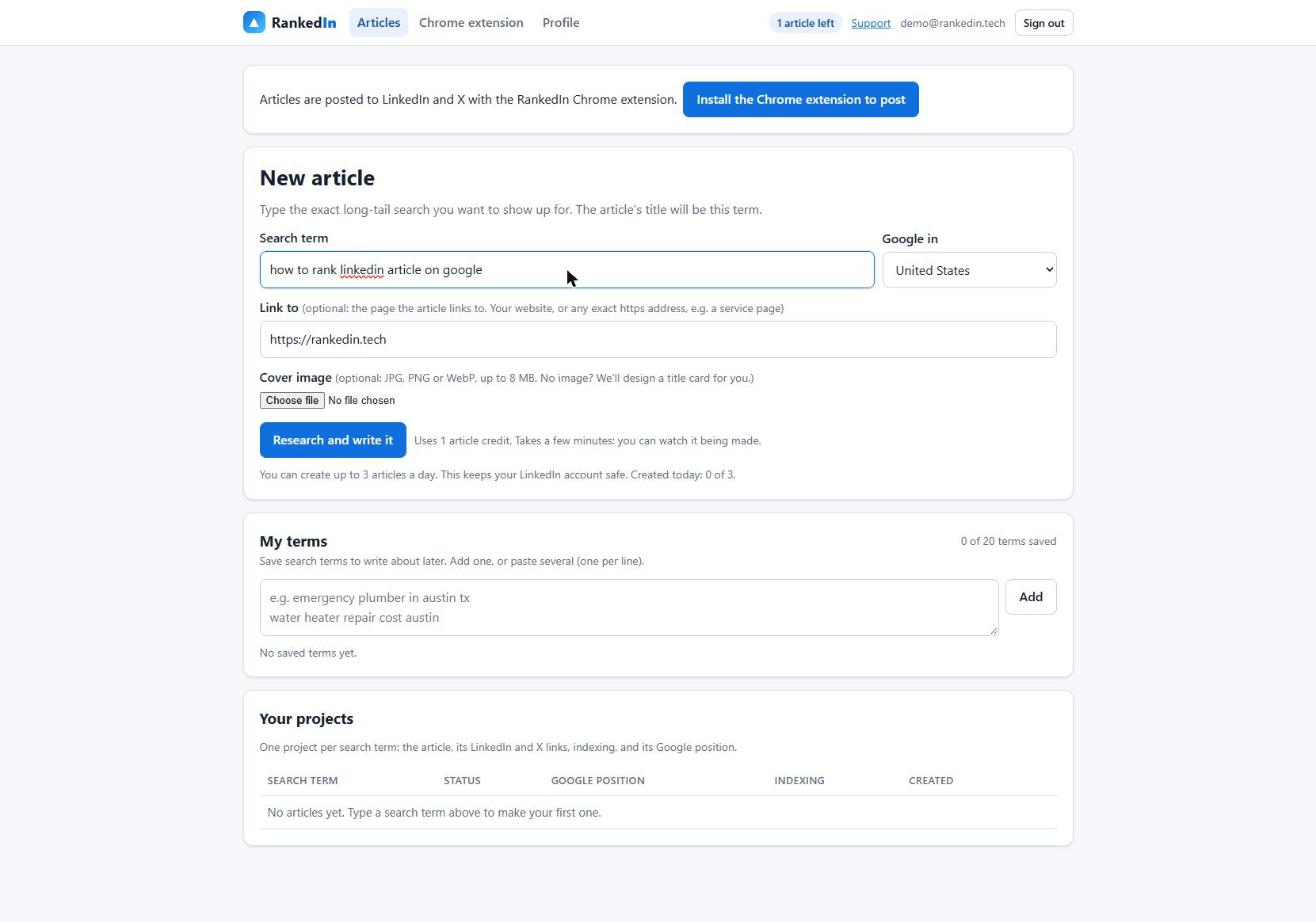
In RankedIn you type the term, pick the Google country, optionally set a "Link to" page (your website by default) and a cover image. Without a cover, RankedIn designs a title card. You can also save up to 20 terms in "My terms" and write any of them later. Our worked example: "how to rank linkedin article on google" on Google United States.
Step 2: Research what already ranks and find the gaps
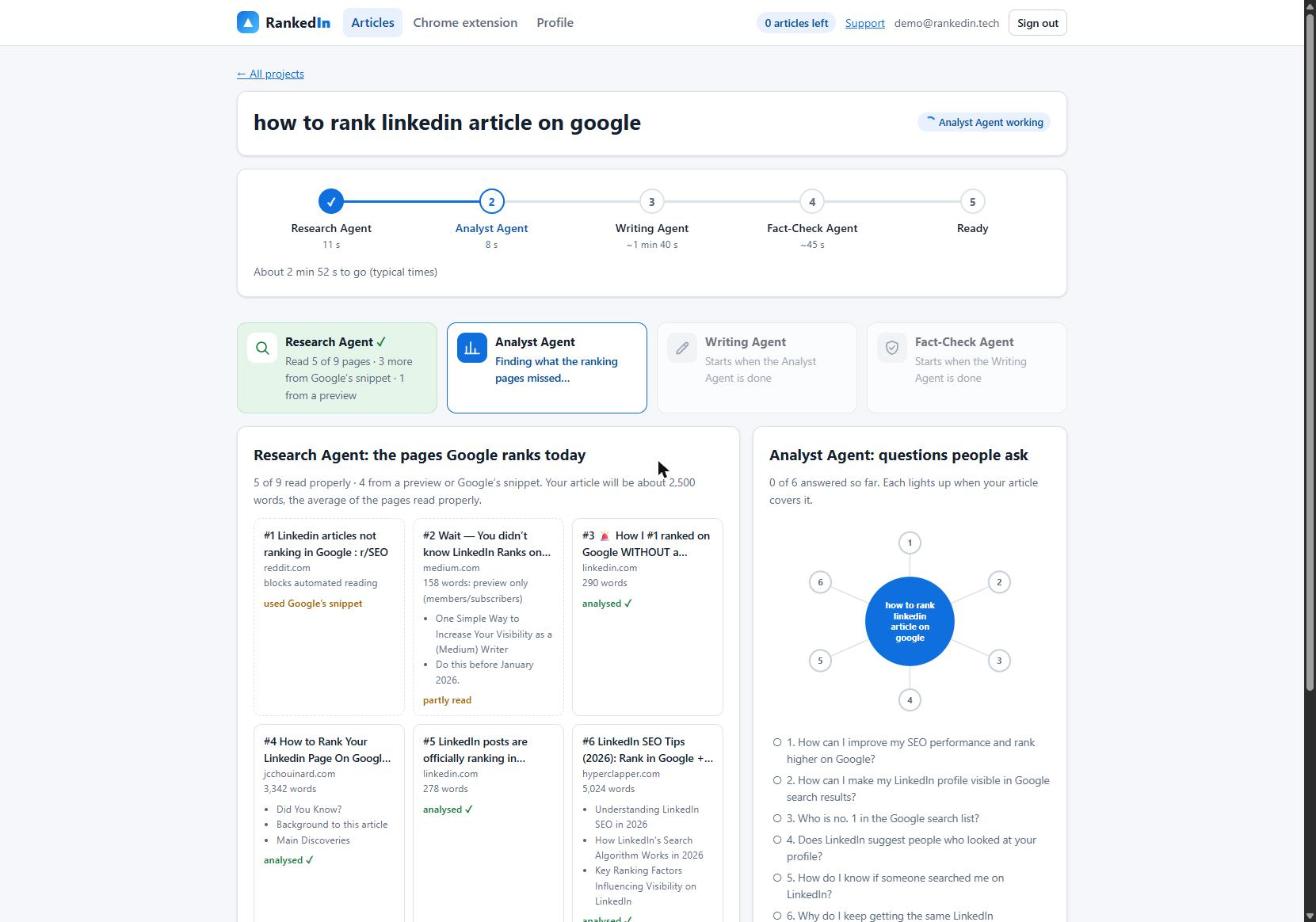
Good SEO writing starts with reading the competition, not with a blank prompt. RankedIn's Research Agent fetches Google's live top 10 for your term and reads every ranking page at the same time. Pages that block automated reading, such as Reddit, are covered with Google's own snippet. It sets the target length from the average of the pages it read properly, kept between 1,200 and 3,000 words.
The Analyst Agent then finds the gaps the ranking pages miss, picks the People Also Ask questions to answer, and builds an outline.
In our real run, the Research Agent took 11 seconds. It read 5 of 9 ranking pages properly, covered 3 more from Google's snippet and 1 from a preview, and set a target of about 2,500 words. The Analyst Agent took 15 seconds and found 6 gaps and 4 questions to answer.
Step 3: Write, fact-check and read it yourself
The Writing Agent writes the article live, word by word. The title is the exact search term in Title Case, the article contains one natural link to your "Link to" page, and it ends with an FAQ built from Google's People Also Ask questions.
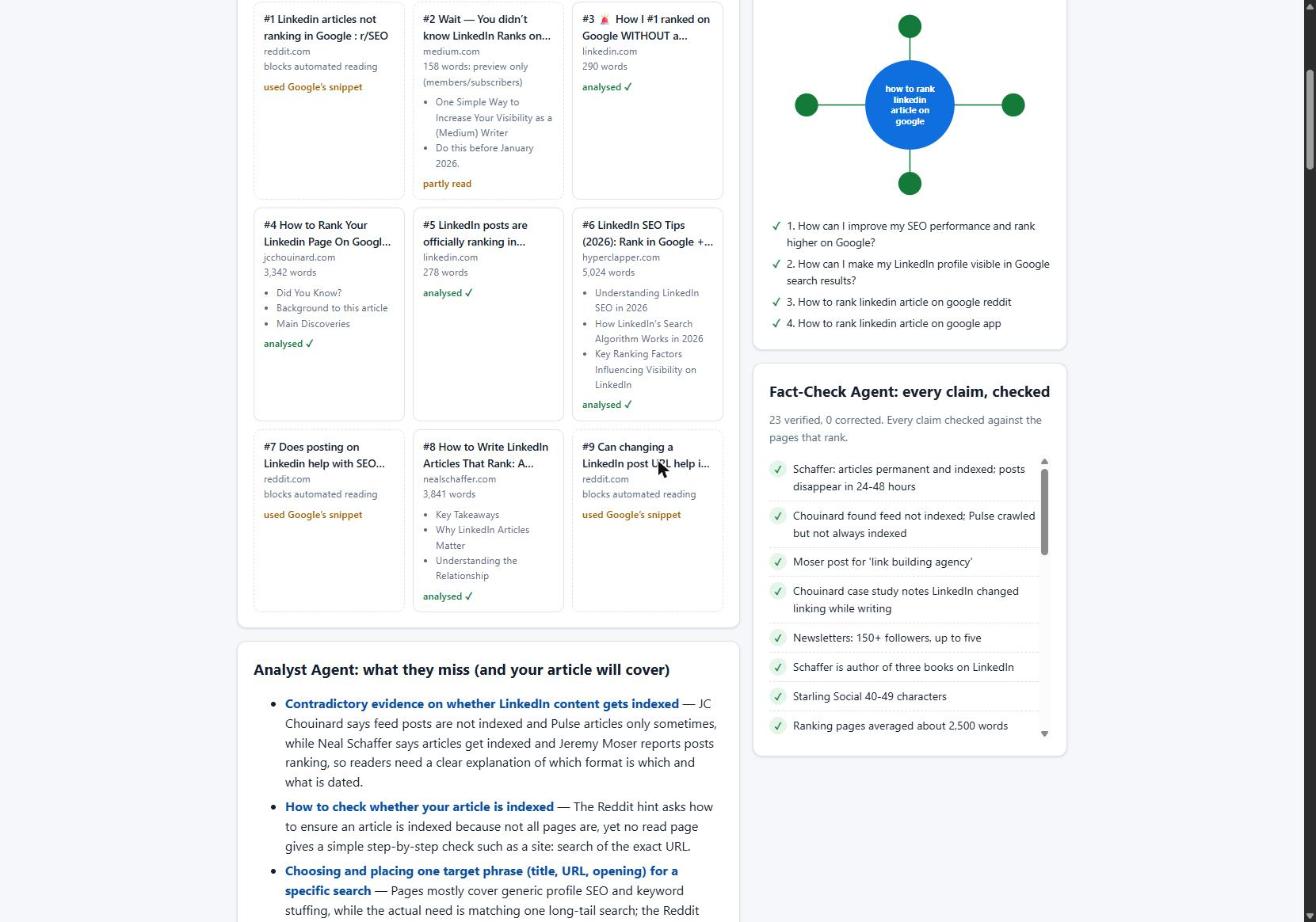
Then the Fact-Check Agent lists up to 25 factual claims and checks each one against the research. It applies corrections only (it never rewrites the article) and re-checks the corrected sentences. If anything important is still wrong, the article is marked "Needs review" instead of "Ready".
In our run, the Writing Agent produced 2,608 words in 1 minute 13 seconds. The Fact-Check Agent checked 23 claims in 11 seconds and corrected 0. All four agents finished in 1 minute 51 seconds.
Fast is not the same as finished. Read the article yourself before posting. Add at least one detail only you could know: a number from your own work, a client situation, a lesson from your career. Several ranking pages make the same point for feed posts, and it matters even more for an article that carries your name in Google.
Step 4: Post it into LinkedIn and publish it yourself
RankedIn's Chrome extension opens LinkedIn's article editor and fills in the title, the article with LinkedIn's own Heading and Subheading styles, the cover image, the search term as the cover caption and your business details. After you click "Next", it fills in the feed post that announces the article. You read it and click Publish yourself; RankedIn never publishes for you. Then X opens with a post ready that links to the article, and you click Post.
Posting sounds trivial, but formatting can break. We found that line breaks between blocks of pasted HTML made LinkedIn's editor insert empty paragraphs: a 12-block article became 23 blocks, 11 of them empty. Sending compact HTML fixed it, so 12 blocks stay 12. If you paste AI output by hand, check for this.
To keep your LinkedIn account safe, RankedIn allows at most 3 new articles a day per customer.
Step 5: Get it indexed, then check where it shows up
An article cannot rank until Google has indexed it. After you publish, RankedIn sends the LinkedIn article link and the X post link together to PetesIndexer, the indexing service we use. RankedIn shows a link as indexed only when PetesIndexer confirms Google has indexed it; until then it says "Submitted, indexing in progress". Indexing is not guaranteed, and a link that is not indexed is sent again once automatically. More on how this works in are LinkedIn articles indexed by Google.
Then check where it shows up. To see where it shows up, use the Test Now link next to the project in RankedIn: it opens that exact Google search in the project’s country.
Here is our own honest status. On 23 October 2026 we published four articles written with RankedIn, including How to Rank a LinkedIn Article and The Best AI Overviews MCP. That same day all four were submitted to PetesIndexer with indexing in progress, and none was in Google's top 100 yet, which is expected this early.
A checklist for judging any AI tool for SEO LinkedIn articles
Use these yes/no questions on any tool, including RankedIn:
- Does it read the live Google results for your exact term, in the country you choose?
- Does it find gaps and answer People Also Ask questions, or just write around a topic?
- Does it write a full article, not only a feed post?
- Does it set length from evidence, such as what the ranking pages actually do?
- Does it check claims against sources and show what it checked and changed?
- Does it help with posting without breaking LinkedIn's formatting?
- Does it help with indexing, and label status honestly?
- Do you stay in control of publishing, with nothing posted without your click?
- Is it honest that rankings are never guaranteed?
- Is the vendor open about conflicts? Several ranking lists are written by the tools they recommend: Autoblogging.ai ranks its own product first and says so, LogicBalls added a note that its list is not a neutral survey, and The AI Marketing Agency's list puts TAMA first. We are a vendor too, which is why we give you criteria instead of a ranking.
If a tool says yes to most of these, it can take you from search term to a published, indexed article. If it only drafts text, plan to do the rest by hand.
Frequently asked questions
How to enhance LinkedIn with AI?
Use AI for the parts it does well, such as research, structure and drafting, and keep your own stories and details in the final text. For feed posts, the ranking guides recommend giving the AI your voice and examples. For search traffic, use AI to write full LinkedIn articles aimed at specific Google search terms, then read and edit them before you publish.
How to write an SEO article?
Pick one specific search term, read the pages that already rank for it, and note what they miss and what people ask. Write an article that answers the search directly, covers those gaps and stays accurate. Then publish it, make sure it gets indexed and track its position over time.
What is the best AI for content writing?
It depends on the job. The ranking pages describe Claude as strong for nuanced, professional writing, ChatGPT as a fast all-rounder, and Taplio as built for LinkedIn feed posts with analytics and scheduling. For SEO LinkedIn articles, judge any tool against the checklist in this guide rather than a generic ranking.
Which AI is best for SEO writing?
The best one is the tool that reads the live results for your term, finds the gaps, checks its facts and fits where you publish. SEO writers like Surfer, Frase or Autoblogging.ai assume a blog on your own site, while RankedIn is built for LinkedIn articles. Your first RankedIn article is free, so you can test it on a real search term.
Can you use AI for SEO?
Yes. Google says it rewards helpful content however it is produced, and thin, unedited output is what fails. Give the AI real research, check its claims, add details only you know, and remember that no tool can guarantee rankings or indexing.