How Long Should a LinkedIn Article Be
Published · Updated · By the RankedIn team
The short answer: there is no fixed length, and the ranking pages disagree
How long should a LinkedIn article be? LinkedIn itself sets no word limit. Its help page on writing articles says only that the best-received articles are longer than three paragraphs. Every other number you will find is someone's recommendation.
Our answer is to stop picking a range and measure instead. Look at the pages Google already ranks for your exact search and aim near their average length, kept between 1,200 and 3,000 words. For this search, that works out to roughly 1,600 words.
The advice we read is all over the place. Across the 8 ranking pages we could read properly, recommendations run from 600–1,200 words up to 1,500–3,000 words. This post explains why those ranges conflict, how to set a target from data instead, and what that looked like in two real cases. It covers length, not layout. For making a long piece easy to read, see our guide to making a long LinkedIn article readable.
Articles and posts are measured differently: don't mix up the numbers
Much of the confusion comes from treating two formats as one. A LinkedIn feed post is the short update in the feed. A LinkedIn article is a long-form page with its own URL, published through LinkedIn's editor.
- Feed posts are often measured in characters. Facelift says successful posts tend to be either 1,300–2,000 characters or 150–300 characters. It also says long posts usually run 200–400 words, and that roughly the first 200 characters appear before the "See more" cutoff.
- Articles are measured in words. Each figure in the next section refers to articles.
So is 300 words too long for a post? Not by these sources. It sits inside Facelift's 200–400 word range for long posts, and inside growthgurukul's 150–500 words. For an article, though, 300 words is thin. Most sources quote figures several times higher. Neil Patel sums up the split: posts drive reach, while articles build credibility and keep surfacing in search.
Why the generic ranges can't be trusted on their own
Here is what the ranking pages recommend for articles, and what each figure rests on:
- Neil Patel: 600–1,200 words. Framed as "tends to work well", with no data given. He adds that structure and clarity matter more than the count.
- Contently: 1,000–3,000 words "for in-depth content". No source given.
- Tom Popomaronis: 1,500–2,000 words. He calls shorter posts "proven" to get less engagement but cites no study. The piece marks his 50th article after four years of publishing from 2014, so the advice dates from around 2018.
- Ready for Social: 1,500–2,000 words. It says "statistics show" this, with no source.
- Facelift: 1,900–2,200 words. No source, though it also stresses quality over quantity.
- growthgurukul: 1,500–3,000 words. Its reasoning is that longer pieces increase dwell time. Its benchmark tables are not sourced.
- LinkedIn Help: no limit. It says only that articles longer than three paragraphs are best received.
None of these pages explains where its range comes from or how to choose between it and the others. Most are opinions, and some are years old. To be fair, they agree on two things: articles are long-form, and quality beats hitting a number. What they lack is a way to decide for a specific topic.
Set the length from the pages already ranking for your search
Google already shows you which pages satisfy a given search. Their length is the best evidence you have for that search, much better than a universal range. The method takes five steps:
- Search your exact term in the Google country you care about.
- Open the top results, roughly the first page.
- Count the words in the main content of each page. Ignore cookie banners, menus and comment widgets.
- Average only the pages you could read properly. Some sites block automated reading, and Reddit is a common example. For those you only see Google's snippet, which is useful as a hint about the angle but tells you nothing about length.
- Aim near that average, within the guardrails below.
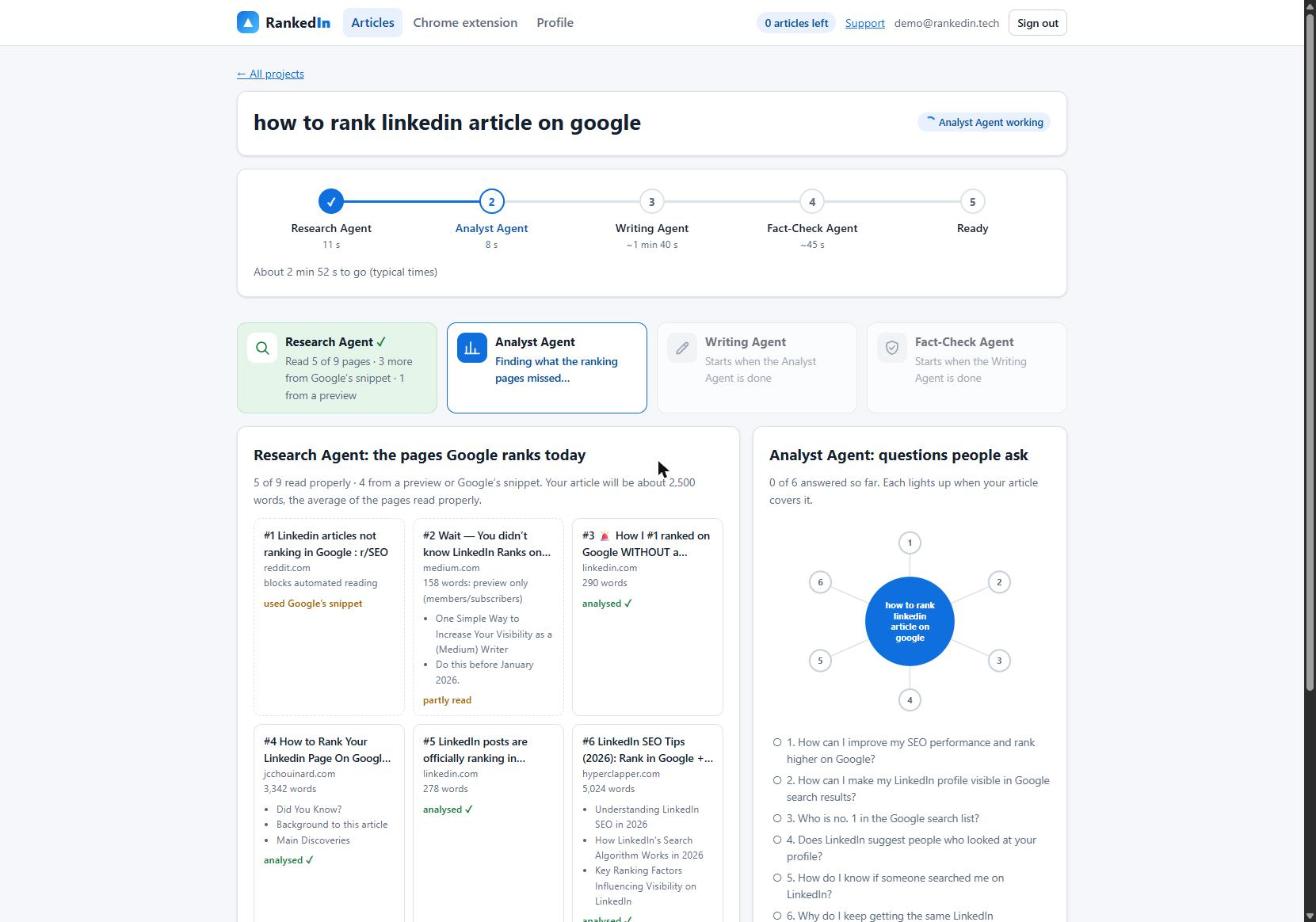
This is how RankedIn's Research Agent works. It fetches Google's live top 10 for the term and reads every ranking page at the same time. Blocked pages are covered with Google's snippet. The target length is the average of the pages it read properly.
Keep the target between 1,200 and 3,000 words
An average alone can mislead, so we clamp it to a band.
- The 1,200-word floor stops an article from coming out too thin. If the ranking pages are short help pages averaging 600 words, a 600-word article has little room to add anything they lack. Below about 1,200 words, an article struggles to answer the follow-up questions too.
- The 3,000-word ceiling prevents bloat. If the average is pushed to 5,000 words by one huge guide, copying that length invites padding.
The number is a target, not a quota. If you have covered the question and the follow-ups in fewer words, stop. If a section needs more room to be accurate, give it room.
Worked example: how a 2,500-word target was set for "how to rank linkedin article on google"
Here is a real run from 23 October 2026, for the term "how to rank linkedin article on google" on Google United States:
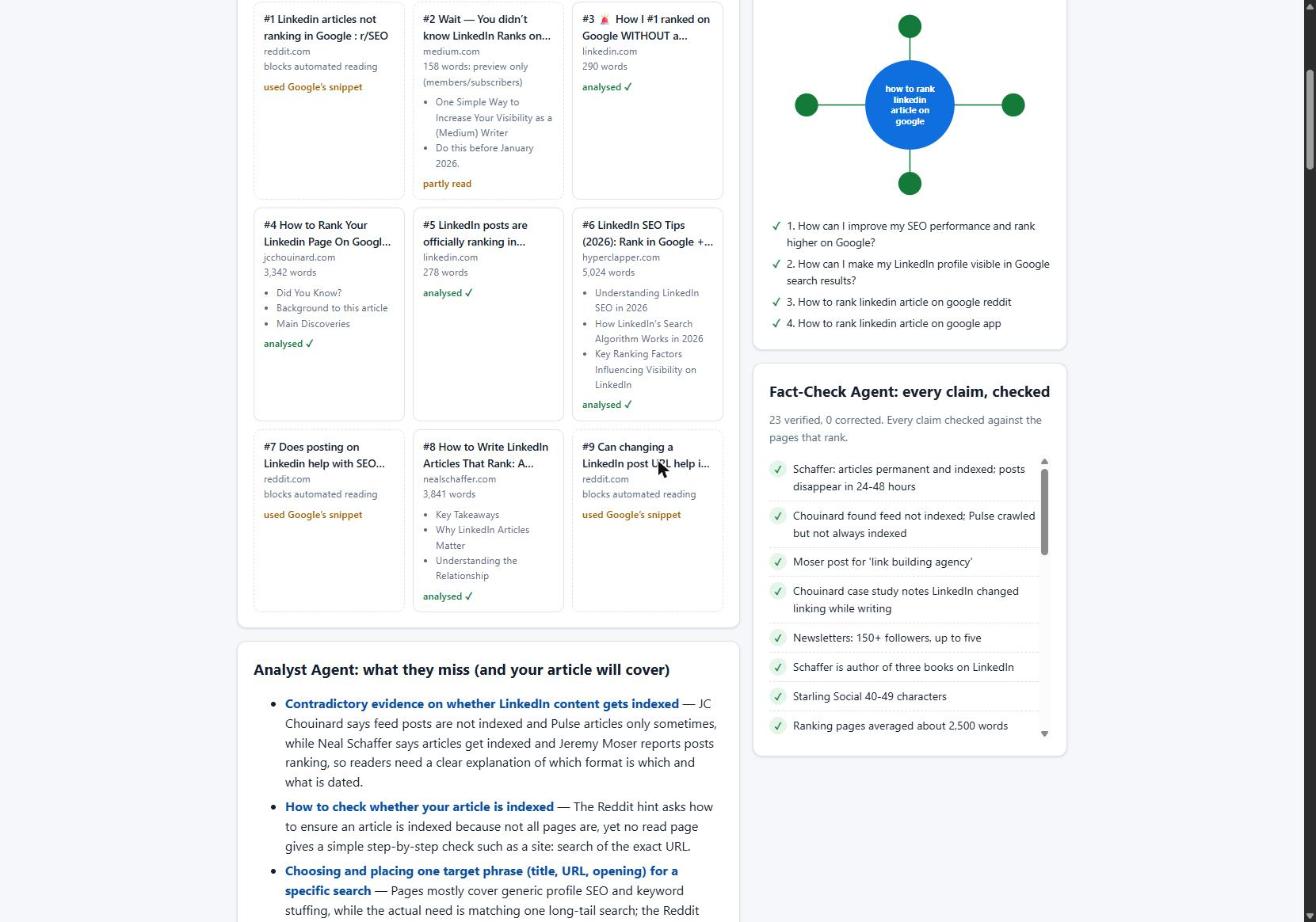
- Research Agent, 11 seconds: 9 ranking pages. It read 5 properly, covered 3 more from Google's snippet and 1 from a preview.
- Target: about 2,500 words, the average of the 5 pages read properly. That sits inside the 1,200–3,000 band, so no clamping was needed.
- Analyst Agent, 15 seconds: found 6 gaps and 4 questions to answer.
- Writing Agent, 1 minute 13 seconds: wrote 2,608 words, about 4% over target.
- Fact-Check Agent, 11 seconds: checked 23 claims and corrected none.
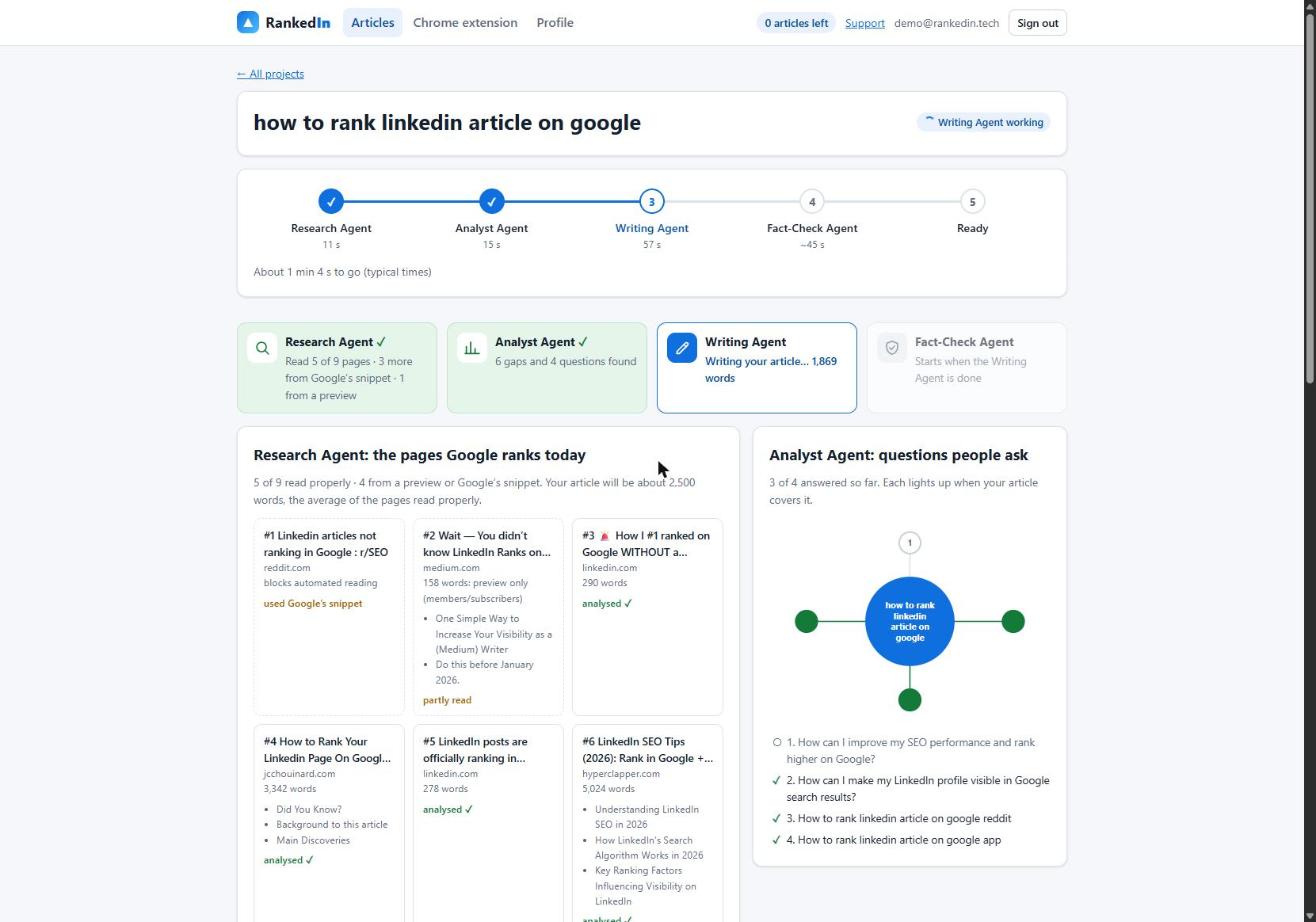
Notice that only 5 of the 9 pages set the number. The other four shaped the angle but not the length. This is one run, not a law. It shows how the method behaves on a real search, and the playbook behind it is in our guide to ranking a LinkedIn article on Google. Matching the length of ranking pages does not guarantee a ranking, and RankedIn does not guarantee rankings.
Apply it to this very search: what the data says about "how long should a linkedin article be"
For this term on Google United States there were 9 results. We read 8 properly. The ninth was a Reddit thread that blocks automated reading, so we only had its snippet. The eight readable pages measured:
- Popomaronis (LinkedIn article): 2,068 words
- LinkedIn Help: 467 words
- Contently: 1,241 words
- Facelift: 1,477 words
- Neil Patel: 2,203 words
- Ready for Social: 874 words
- LinkedIn advice page on blog posts: 3,239 words
- growthgurukul: 1,799 words
Our research reported an average of 1,610 words. A straight average of the eight counts above comes out at about 1,671, close to the 1,610 reported. Either way, the target lands at roughly 1,600–1,700 words, well inside the band.
Two pages are not really like-for-like. The LinkedIn Help page is a short help entry, and the 3,239-word LinkedIn advice page is about blog posts in general, filled with contributor comments. They roughly cancel each other out, and that is the point of averaging. One odd page cannot drag the target far.
When to go shorter or longer than the average
The average gives you a starting point. Adjust it with judgment:
- Match depth to intent. A quick factual question deserves a quick answer near the top, even if the page goes on to cover follow-ups.
- Answer early. Neil Patel notes that many articles lose readers in the first two paragraphs while the writer warms up.
- Cut padding. Remove any sentence that repeats an earlier point or exists only to add words.
- Don't stretch to hit a number. Ready for Social warns against writing for length's sake, and Facelift stresses quality over quantity.
- Go longer when the gaps demand it. If the ranking pages skip an important question, answering it well is worth the extra words.
Is it worth writing LinkedIn articles at all? The sources say they can reach beyond your network. Neil Patel and Contently both say public articles are indexed by Google, and Facelift says well-written ones can appear in search results. Our own keyword research on 23 October 2026 covered 17 searches about ranking or indexing LinkedIn articles. A linkedin.com/pulse article was in the live top 10 for 13 of them. For how indexing works, read whether LinkedIn articles are indexed by Google.
Check the result: measure after publishing
You can only judge whether a length worked once the article is live and indexed.
- Confirm indexing first. RankedIn sends the article link and its X post link to PetesIndexer. It shows a link as indexed only when PetesIndexer confirms Google has indexed it, and until then it says "Submitted, indexing in progress". Indexing is not guaranteed. A link that is not indexed is sent again once automatically.
- Check where it shows up. To see where it shows up, use the Test Now link next to the project in RankedIn: it opens that exact Google search in the project’s country.
- Adjust the next article, not this one, too early. Our own four articles published on 23 October 2026 were still indexing that day and not yet in the top 100, which is expected this early. One example is How to Rank a LinkedIn Article. We make no ranking claims about them yet.
If a well-indexed article stalls, look at the gaps it missed before you add words. Length is a sign of depth, not a ranking factor you can dial up.
Frequently asked questions
What is a good length for a LinkedIn article?
There is no single right length, and LinkedIn sets no word limit. A good target is the average length of the pages already ranking for your search, kept between 1,200 and 3,000 words. For the search "how long should a linkedin article be", that is roughly 1,600 words.
What is the optimal size for a LinkedIn article post?
Published ranges run from 600–1,200 words (Neil Patel) up to 1,500–3,000 words (growthgurukul), and none of them is backed by a cited study. LinkedIn Help says only that articles longer than three paragraphs are best received. Measuring the ranking pages for your own term gives you a target specific to that topic.
Is 300 words too long for a LinkedIn post?
No. For a feed post, 300 words sits inside Facelift's 200–400 word range for long posts and growthgurukul's 150–500 words. For an article, 300 words would be much shorter than any recommendation in the research.
Is it worth writing articles on LinkedIn?
It can be. Neil Patel and Contently say public LinkedIn articles are indexed by Google, and in our own research a linkedin.com/pulse article appeared in the top 10 for 13 of 17 searches we checked. Rankings and indexing are never guaranteed, so track results after publishing.
What are the recommended LinkedIn post sizes for 2026?
None of the pages we researched gave sourced 2026 figures. What they agree on is that the formats differ: feed posts are usually discussed in characters or a few hundred words, while articles run to over a thousand words. For an article, set the length from the current pages ranking for your term rather than a fixed yearly number.
How long should a LinkedIn article be, according to Reddit?
A Reddit thread ranks for this search, but it blocks automated reading, so we could only see Google's snippet. The snippet shows marketers discussing LinkedIn articles for search and AI citations, but it gives no word count. We treated it as a hint about interest, not as a source for length.