How to Rank LinkedIn Article on Google
Published · Updated · By the RankedIn team
Yes, a LinkedIn article can rank on Google, mainly for specific, low-competition searches. Public articles written in LinkedIn's article editor get indexed by Google. Ordinary feed posts mostly do not. No one can guarantee a ranking, and we won't either.
So if you want to know how to rank LinkedIn article on Google, the useful answer is a process rather than a list of tips. Pick one search term you can win, write the most useful page for it, get it indexed, then track its position. Below is the exact playbook we run at RankedIn, step by step. The worked example is this very search term.
The short answer, and the evidence behind it
The ranking pages for this term agree that Google indexes LinkedIn articles, which live at linkedin.com/pulse addresses. The Trusted Voice says articles usually appear within 24 to 48 hours. It also says feed posts mostly sit behind LinkedIn's login wall and are largely blocked from search crawlers.
Our own check suggests that articles can compete. On 23 October 2026 we ran 17 searches about ranking or indexing LinkedIn articles on Google United States. A linkedin.com/pulse article was in the live top 10 for 13 of them, and at number 1 for 4. All four number-one spots belonged to one article, Look Left Marketing's piece on whether Google indexes LinkedIn articles.
The limit is competition. Look Left notes that a term like "Air Jordan", with 135,000 monthly searches, would be near impossible for a LinkedIn article to rank for. A small, specific query has a real chance. That is why every step below starts from one long-tail term.
Step 1: Choose one long-tail term and a Google country
Most of the 17 searches we checked are small, about 10 a month. "linkedin article writer" was larger, at about 260 a month. Small is fine. A narrow term with clear intent is one you can answer better than anyone else.
- One term per article. Do not try to cover five searches in one piece.
- Look at who ranks now. If LinkedIn articles already appear in the top 10, the format can clearly compete for that term.
- Avoid head terms. Big, competitive phrases are the "Air Jordan" problem.
- Answer from real experience. First-hand specifics are what make a page the most useful one.
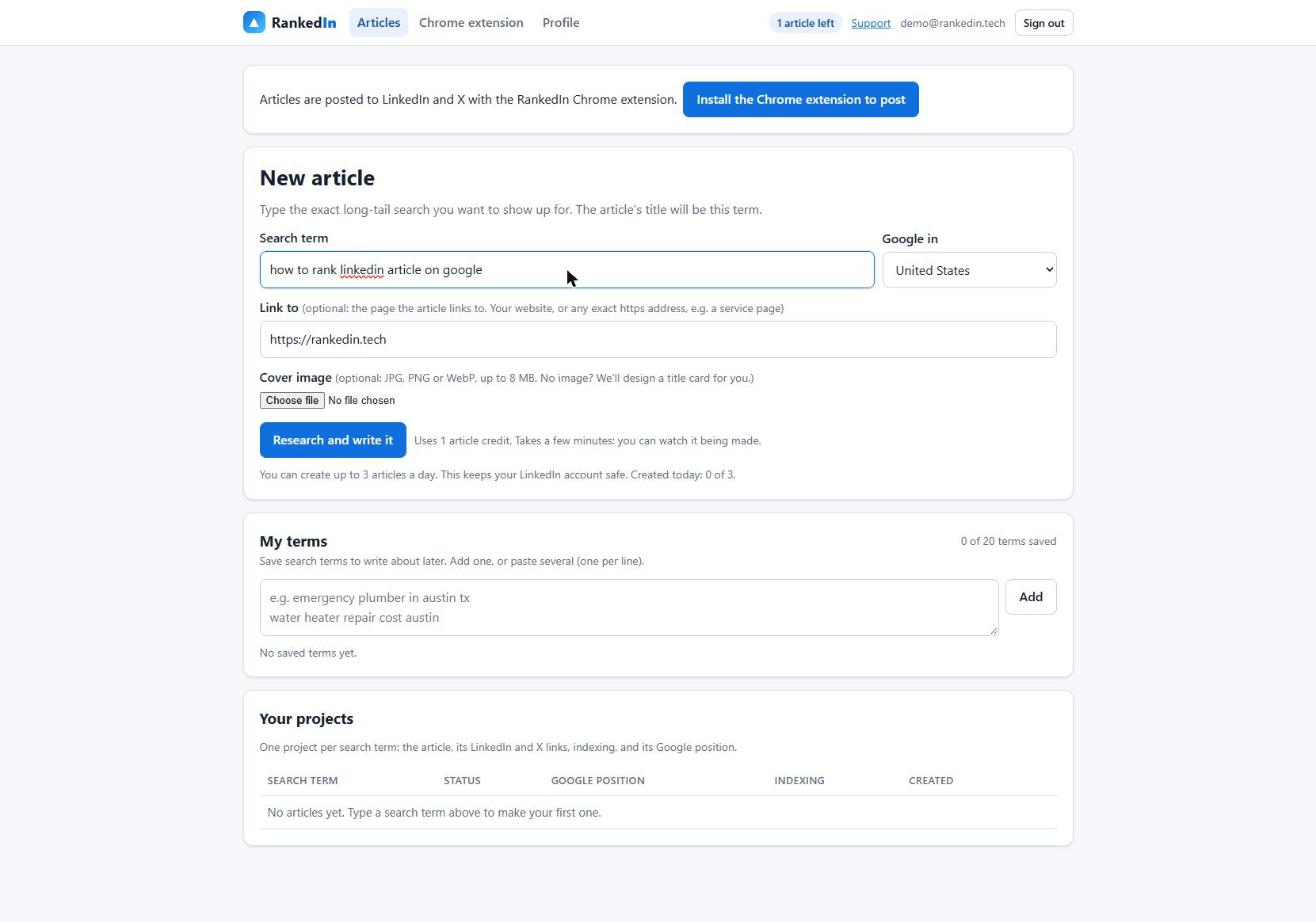
In RankedIn you type the term and pick the Google country (we used Google United States). You can also set a "Link to" page, which defaults to your website, and add a cover image. If you skip the cover, RankedIn designs a title card.
Step 2: Read what already ranks and set the length
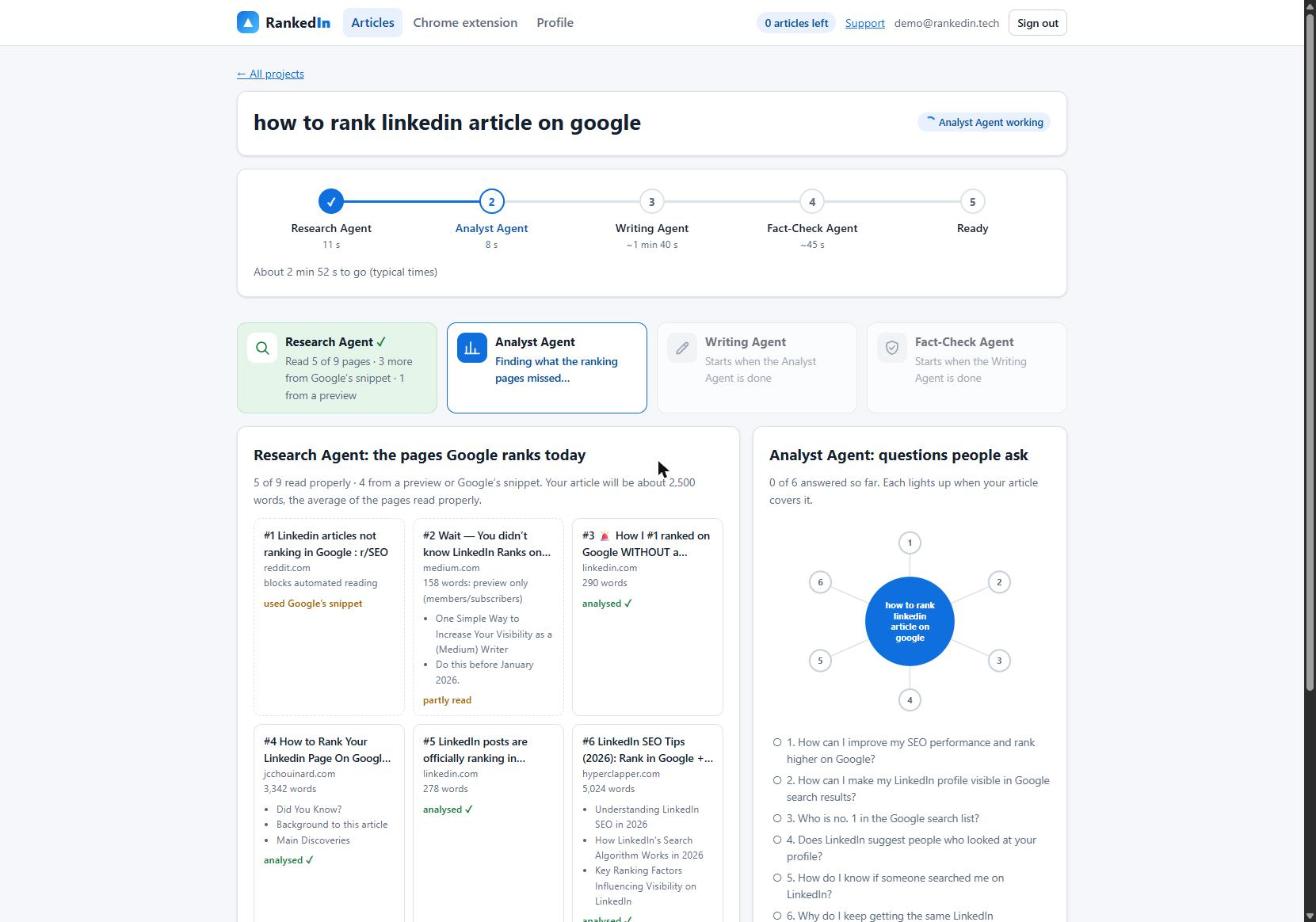
Before writing anything, read the pages Google already ranks for the term. Our Research Agent fetches Google's live top 10 and reads every ranking page at the same time. In this run it took 11 seconds. Of the 9 ranking pages, it read 5 properly, covered 3 more from Google's snippet and 1 from a preview. Pages that block automated reading, such as Reddit, are covered with Google's own snippet.
The agent then sets a target length from the average length of the pages it read properly. That target is kept between 1,200 and 3,000 words. Here it came to about 2,500 words. Length is not a ranking rule in itself. It is a rough guide to how much ground searchers expect a page to cover.
Step 3: Find what the ranking pages miss
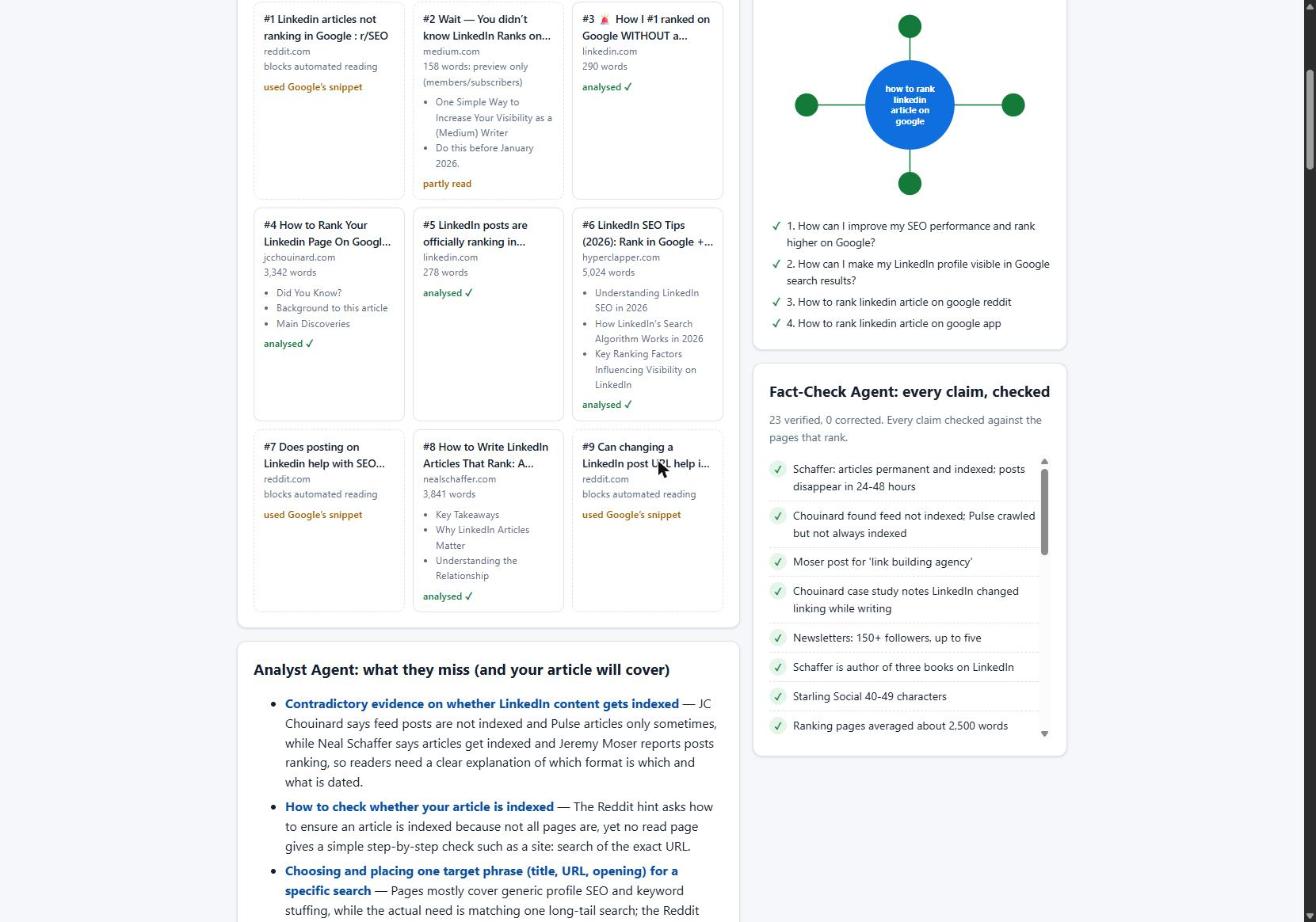
Matching the top results only gets you level with them. To be more useful, you need to cover what they leave out. Our Analyst Agent compares the ranking pages, picks the People Also Ask questions worth answering and builds an outline. In this run it found 6 gaps and 4 questions in 15 seconds.
For this term, the gaps included:
- No page gives a sequence from picking a term to checking a Google position. They offer scattered tips instead.
- Advice on reposting blog content conflicts from page to page (more on this below).
- Pages say articles "get indexed" but do not show how to confirm it or track the position.
- Almost none admit that rankings are not guaranteed.
Step 4: Write the article with the basics in place
Our Writing Agent wrote 2,608 words in 1 minute 13 seconds, shown live word by word. Every article gets these basics:
- The title is the exact search term in Title Case.
- One natural link to your "Link to" page.
- An FAQ built from Google's People Also Ask questions.
- Clear headings. Look Left points out that LinkedIn's heading styles help Google understand what the article covers.
Look Left also describes LinkedIn's SEO title and SEO description fields. You find them under Settings in the Publishing menu of the article editor. For the full item-by-item list, see our on-page checklist for LinkedIn article SEO.
Why we don't paste in an existing blog post
The sources disagree on reposting:
- Look Left says LinkedIn doesn't support canonical tags, so Google may not recognise your website as the original.
- Neal Schaffer cites Google's John Mueller as saying duplicate content is filtered out rather than penalised.
- A Reddit thread's snippet says Google ranks the most authoritative version of identical content. On a domain as large as LinkedIn, that can be the copy rather than your original.
- Stu Lees, who tested LinkedIn articles for SEO, calls straight copy and paste a bad idea.
Our approach avoids the problem completely. We write a new article for the search term rather than reusing an existing post.
Step 5: Check every claim before it goes anywhere
A confident mistake can undo a useful article. Our Fact-Check Agent lists up to 25 factual claims and checks each one against the research. It applies corrections only, so it never rewrites the article, and then it re-checks each corrected sentence. If something important is still wrong, the article is marked "Needs review" instead of "Ready".
In this run, the agent checked 23 claims and none needed correcting. It took 11 seconds. The whole run, from search term to a checked article, took 1 minute 51 seconds.
Step 6: Fill LinkedIn's editor, then press Publish yourself
RankedIn's Chrome extension opens LinkedIn's article editor and fills in:
- the title
- the article, using LinkedIn's own Heading and Subheading styles
- the cover image, with the search term as the cover caption
- your business details
- after you click "Next", the feed post that announces the article
You read it and click Publish yourself. RankedIn never publishes for you. Next, X opens with a post ready that links to the article, and you click Post.
The empty-paragraph problem we fixed
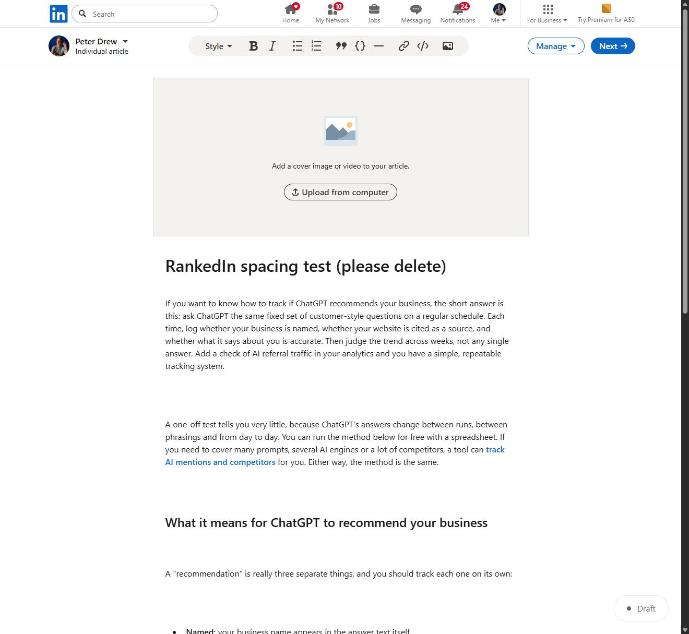
When we pasted HTML, the line breaks between blocks made LinkedIn's editor insert empty paragraphs. A 12-block article became 23 blocks, and 11 of them were empty. Sending compact HTML fixed it, so 12 blocks now stay 12. If you paste articles by hand, check your spacing before you publish.
Step 7: Submit the links and wait for confirmation
After publishing, the LinkedIn article link and the X post link are sent together to PetesIndexer, the indexing service RankedIn uses. RankedIn shows a link as indexed only when PetesIndexer confirms Google has indexed it. Until then, the status reads "Submitted, indexing in progress". If a link is not indexed, it is sent again once automatically. Indexing is not guaranteed.
To check a link yourself, follow our step-by-step guide on how to tell whether a LinkedIn article is indexed by Google. Note that this step covers articles. Getting your LinkedIn profile indexed is a separate matter.
Step 8: Check where it shows up over 30 days
Once an article is live, check where it shows up over the first 30 days. To see where it shows up, use the Test Now link next to the project in RankedIn: it opens that exact Google search in the project’s country. Expect a slow start.
We published four of our own articles on 23 October 2026, including How to Rank a LinkedIn Article. On the same day they were submitted to PetesIndexer with indexing in progress, and not yet in Google's top 100. That is normal this early, and we will report their positions as they change. For what to expect over the weeks after publishing, see our realistic timeline for a LinkedIn article to rank.
If it doesn't rank, and what comes next
- Check indexing first. An article that is not indexed cannot rank.
- Re-check the term. If the top 10 is full of big, authoritative sites, choose a narrower variant.
- Compare again. Read the current top pages and ask what yours still misses.
- Keep LinkedIn search and Google separate. Engagement and connections matter inside LinkedIn's own search. They are not the same thing as a Google position.
A few practical limits apply in RankedIn. You can create at most 3 new articles a day, to keep your LinkedIn account safe. Your first article is free. You can save up to 20 search terms in "My terms" and create an article from any of them later.
Once your first article is live, you can build on it: our guide to how to rank multiple LinkedIn articles shows how to link 10 articles on one topic so they support each other.
Frequently asked questions
How to rank in Google with LinkedIn posts?
Regular feed posts are mostly not indexed by Google, because they largely sit behind LinkedIn's login wall. One marketer's test found that long-form posts did show up on Google, but nowhere near as high as articles. To rank, publish a LinkedIn article aimed at one specific search term. Then use a feed post to announce it.
How to index a LinkedIn profile on Google?
Profile indexing is separate from article indexing. One ranking guide recommends a custom public URL, a complete profile that uses the words people search for, and links to your profile from your own website. RankedIn submits your article link and X post link to PetesIndexer, not your profile.
How to rank higher on LinkedIn search?
LinkedIn's own search works differently from Google. One 2026 guide lists relevance, engagement, connection strength, recent activity and profile completeness as factors. Doing well there helps people find you inside LinkedIn, but it does not decide your Google position.
How do I rank higher on Google search?
For a LinkedIn article, pick one specific, low-competition search term and write the most useful page for it. Then confirm the article is indexed and track its position. Rankings are never guaranteed, so treat each article as a test and improve it based on what ranks.