How To Rank Multiple LinkedIn Articles
Published · By the RankedIn team
If you want to know how to rank multiple LinkedIn articles, the short answer is this: stop treating each article as a one-off. Pick one topic and publish one MAIN article for its shortest, most competitive search term. Then publish 9 longer-tail articles around it. Each of those 9 links to your website, to the MAIN article and to the article published just before it.
This is the method we use and teach at RankedIn. It is a pattern, not a guarantee, because nobody can promise Google rankings. But a linked set of articles can do things a single article cannot, and this guide shows you how to build one, step by step.
This is the Full Ranking Strategy to use in LinkedIn
Why one LinkedIn article is not a strategy
A single article targets a single search. If it ranks, good. If it does not, nothing else is working for you.
Most pages that rank for this search cover how to rank one article: keyword research, titles, backlinks and user experience. One popular post, by Julian Goldie, takes a different route. It describes trying to "own the whole search result" by publishing on one keyword across articles, videos and Reddit.
Our approach stays on LinkedIn and spreads across searches instead of platforms. Ten articles on one topic answer ten different questions people type into Google. The links between them mean each new article supports the ones before it.
LinkedIn articles can compete for these searches. In our keyword research (Google United States, 23 October 2026), a linkedin.com/pulse article was in the live top 10 for 13 of 17 searches about ranking or indexing LinkedIn articles. Most of those searches were small, at about 10 a month. Small, specific searches like these are exactly what a set of articles is built to cover.
Step 1: Pick one topic and write down 10 search terms
Choose one topic that you know well and that your customers search for. Then write down 10 search terms around it:
- The shortest, most competitive term is your MAIN article. It is the one you most want to rank for, and the hardest.
- The other 9 are longer-tail variants. Each one is more specific and usually easier to rank for.
- Each one answers a different question. Cost, timing, comparisons, checklists and how-tos all make good long-tail angles.
Avoid near-duplicates
Two articles written for nearly the same search compete with each other. Google has to pick one, and you have split your effort.
Andy Crestodina gives a simple test in his guide to improving search rankings. Search for both phrases and compare the results. If there is a lot of overlap, it is really the same search, so keep only one of them and find another question.
A worked example: a US small business bookkeeping firm
Imagine a bookkeeping firm in the United States. This example is illustrative only. It is not a real customer, and we claim no results for it.
MAIN term (article 1): small business bookkeeping
The 9 long-tail terms (articles 2 to 10), each a different question:
- how much does bookkeeping cost for a small business (price)
- how often should a small business do bookkeeping (timing)
- bookkeeping vs accounting for a small business (a comparison)
- what records does a small business need to keep (requirements)
- how to catch up on bookkeeping for a small business (a fix)
- cash vs accrual bookkeeping for a small business (a method choice)
- how to choose a bookkeeper for a small business (hiring)
- bookkeeping checklist for a new small business (getting started)
- monthly bookkeeping tasks for a small business (routine)
None of the 9 overlap, so none of them compete with each other. Every topic also connects naturally to "small business bookkeeping". That makes it easy to write a sentence that uses the main term, which you need for the second link.
Step 2: Publish the MAIN article first, then number the rest
The MAIN article goes live first, as article 1. Number the long-tail articles 2 to 10 in the order you publish them.
The MAIN article comes first because every later article links to it. It has to exist, and have a LinkedIn address, before article 2 can point to it.
In RankedIn, each article starts from a search term. You type the term, pick the Google country, set the "Link to" page (your website by default) and add an optional cover.
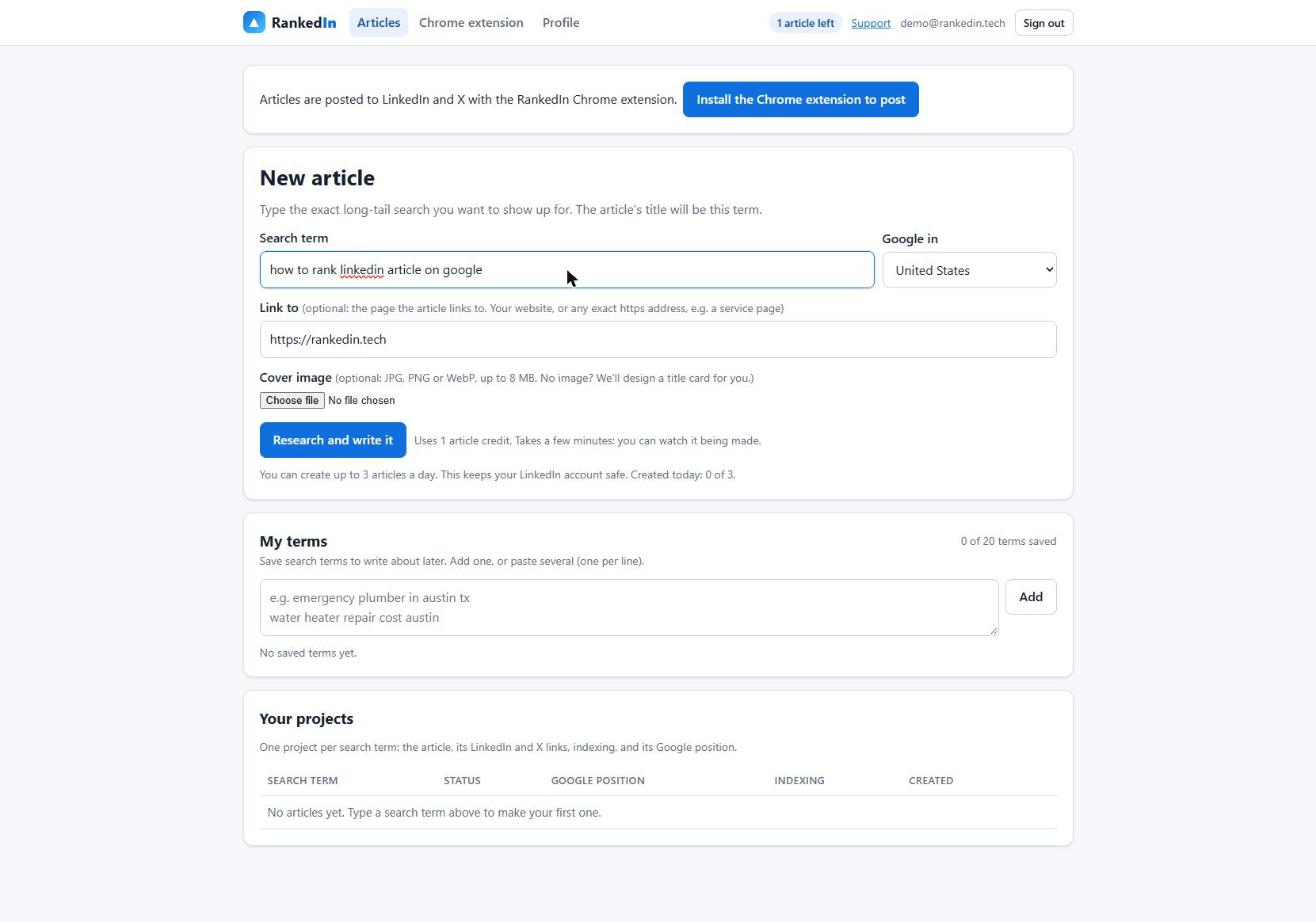
Four agents then do the work. They research the live top 10, find the gaps, write the article and fact-check it. The title is the exact search term in Title Case. Every article also gets a natural link to your "Link to" page, and RankedIn adds links 2 and 3 for you as well (more on that below). For the full single-article process, see our end-to-end playbook for ranking a LinkedIn article on Google.
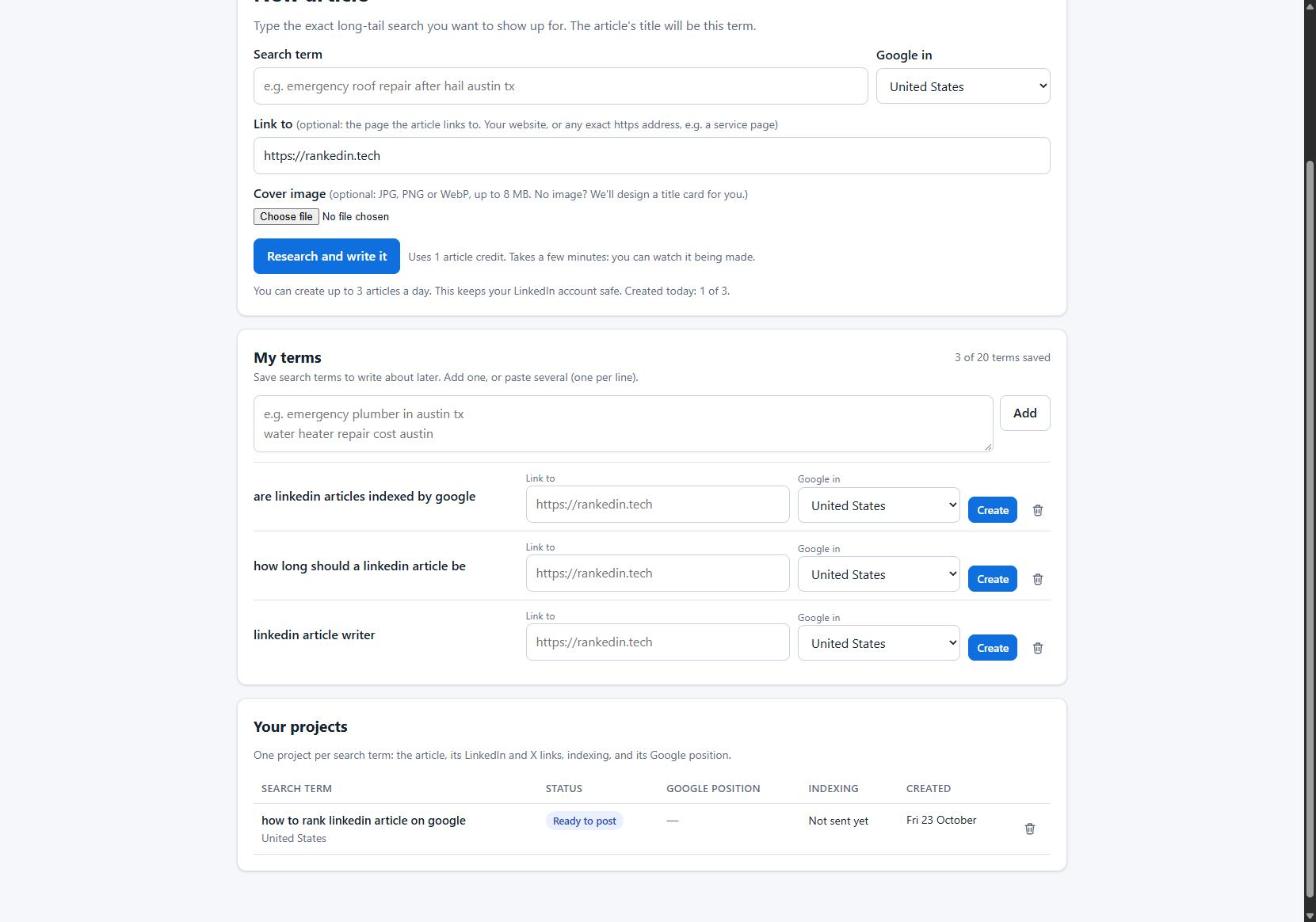
You can save all 10 terms in My terms (up to 20) and create each article on the day it is due.
The linking pattern: website, MAIN article, previous article
Every article after the MAIN one has up to 3 links, in this order:
- Your website. This link comes first and is the most important.
- The MAIN article. Work it naturally into a sentence that uses the main term, for example "...as covered in our guide to small business bookkeeping...".
- The article published just before it. Article 4 links to article 3, and article 10 links to article 9. Put this link inside a natural sentence about that article's topic.
Article 2 is the exception. The article published before it is the MAIN article, so article 2 has only 2 links: your website and the MAIN article.

Here is what the structure produces:
- The MAIN article gets a direct link from all 9 other articles.
- Articles 2 to 9 each also get a link from the article published after them, so the set forms a chain.
- Every article links to your website, including the MAIN article.
Here is how that looks in the bookkeeping set. Article 5 ("what records does a small business need to keep") would link to the firm's website first. Next, it would link to the MAIN article from a sentence such as "good records are the base of small business bookkeeping". Finally, it would link to article 4 from a sentence such as "if you are not sure which you need, read our comparison of bookkeeping vs accounting for a small business".
RankedIn adds all three links for you
You never add links by hand. On RankedIn's New article form, leave Link to my main article ticked and choose your MAIN article from the list. The list shows your published articles for the same website, and RankedIn remembers your choice for that website next time. Articles you create from My terms use that remembered MAIN article too.
The Writing Agent then puts all three links into the article, in this order: your website, your MAIN article (with the main term worked into a sentence), and the article you made just before this one in the same set. Article 2 gets the first two, because the article before it is the MAIN article.
RankedIn's Chrome extension opens LinkedIn's article editor and fills everything in, links included: the title, the article, the cover image and the search term as the cover caption. After you click "Next", it also fills in the feed post that announces the article. You read it over and click Publish yourself, because RankedIn never publishes for you.
If you have not published anything for that website yet, the form tells you this will be your main article, so start with your MAIN term.
A 4-day publishing schedule at up to 3 a day
RankedIn allows at most 3 new articles a day per customer, to keep your LinkedIn account safe. At that pace, 10 articles take about 4 days:
- Day 1: the MAIN article (1), then articles 2 and 3
- Day 2: articles 4, 5 and 6
- Day 3: articles 7, 8 and 9
- Day 4: article 10
Publish in order: the link to the article before goes in once that article is live on LinkedIn.
What happens after each article goes live
After you publish, X opens with a post ready that links to the article, and you click Post. RankedIn then sends the LinkedIn article link and the X post link together to PetesIndexer. The article shows "Submitted, indexing in progress" until PetesIndexer confirms that Google has indexed it.
Indexing is not guaranteed. If a link is not indexed, RankedIn sends it again once automatically. Our guide to how Google indexes LinkedIn articles explains how to check yours. RankedIn also checks each article's Google position (top 100) daily for 30 days and shows a history chart.
What this aims for, and our own Google results
The pattern we aim for is simple. Long-tail articles can rank fast on their own. The MAIN article can then climb over the following days as the links to it build up. The idea is fast wins every day, plus the big term over time. Neither part is guaranteed.
Do long-tail LinkedIn articles really reach the top of Google? Here are our own results, from live searches in Brisbane on Google Australia, 26 October 2026:
- "How Long Should a LinkedIn Article Be" was number 1 for "how long should a linkedin article be". Google showed the article as 16 hours old.
- "How to Rank a LinkedIn Article" was number 1 for "how to rank a linkedin article" and number 2 for "how to rank linkedin article on google". That is one article ranking for two related searches.
- "AI Overviews MCP for ChatGPT" was number 1 for "ai overviews mcp for chatgpt", just above OpenAI's own developer documentation.
- "How To Reverse Engineer AI Overviews" was number 2 for "how to reverse engineer ai overviews".
To be clear, these articles were not built with the hub strategy in this guide. They show what single long-tail LinkedIn articles can do. The hub-and-chain structure is our method for connecting a set of articles like these, so they support each other and a harder MAIN term.
For the wider evidence, read our evidence-first answer to whether LinkedIn articles rank on Google. If you want to try the method, your first article with RankedIn is free.
Frequently asked questions
How to rank multiple LinkedIn articles?
Pick one topic and write down 10 search terms. Publish the shortest, most competitive term first as your MAIN article, then 9 long-tail articles that each answer a different question. Each long-tail article links to your website, to the MAIN article and to the article published just before it. Rankings are never guaranteed, but the links help the whole set support each other.
Do LinkedIn articles rank on Google?
They can. In our keyword research (Google United States, 23 October 2026), a linkedin.com/pulse article was in the live top 10 for 13 of 17 searches about ranking or indexing LinkedIn articles. Our own LinkedIn articles reached number 1 and number 2 for long-tail searches on Google Australia, 26 October 2026. No article is guaranteed to rank.
How many LinkedIn articles should I publish a day?
RankedIn allows up to 3 new articles a day per customer, to keep your LinkedIn account safe. At that pace, a set of 10 articles takes about 4 days: the MAIN article plus 2 long-tail articles on day 1, 3 on day 2, 3 on day 3 and the last one on day 4.
How do I link LinkedIn articles to each other?
With RankedIn you don’t do it by hand. Tick "Link to my main article" on the New article form and choose your MAIN article: RankedIn adds the link to your website, the link to the MAIN article and the link to the article published just before it, and the Chrome extension fills them into LinkedIn. You only click Publish.
Is a LinkedIn article series the same as a LinkedIn Newsletter?
LinkedIn describes Newsletters as recurring article series delivered to subscribers, who are notified of each new edition. The set in this guide is different: each article targets its own Google search term and links to the others in a fixed pattern. You can run both side by side.
Why are my LinkedIn articles not ranking in Google?
Common causes are an article that is not indexed yet, two articles competing for nearly the same search, or a term that is too competitive for a new article. Rankings can also change: one Reddit user with almost a hundred articles, most of them on page 1 or 2, said that in the past week none of their articles would rank. Check indexing first, then target a more specific long-tail term.