LinkedIn AI Articles
Published · Updated · By the RankedIn team
If you searched "LinkedIn AI articles", you probably want to know two things: can you use AI to write articles on LinkedIn, and will it hurt you? None of the sources we reviewed shows LinkedIn banning AI-assisted writing. However, LinkedIn is actively cutting the reach of content its systems classify as low-quality AI "slop".
So the useful question is where to use AI, not whether to use it. In our experience building RankedIn, AI is strong at research and first drafts. It needs guardrails everywhere else: claims must be checked against sources, and a human must read the draft and click Publish. This guide covers both, using our own four-agent workflow and real numbers from it.
What "LinkedIn AI Articles" Means and Why the Search Is Confusing
Google's top results for this term mix four different things:
- Articles about AI published on LinkedIn, such as a newsletter of generative AI articles and a BCG piece on how AI is reshaping everything.
- AI-written content, covered by a CNN report on LinkedIn fighting AI-written posts and a Reddit thread claiming every post seems to be made with AI.
- LinkedIn articles that AI tools cite, covered by Good2bSocial and Social Media Today.
- LinkedIn's own AI features, such as the AI hiring tools on LinkedIn's Talent blog.
None of these pages explains how to write a LinkedIn article with AI without falling into the slop trap. That is the focus of this post.
Does LinkedIn Allow AI-Generated Content?
The research shows no stated ban. CNN's October 2026 report describes a growing effort to reduce the distribution of generic AI content:
- In August, LinkedIn added a button that lets users flag a post that "seems like AI slop". It was clicked more than 1 million times in its first two weeks.
- A team made up largely of former journalists and social media experts helps train LinkedIn's AI model on what authentic, useful posts look like. If the model flags a post as low-quality AI content, the post is less likely to be shown beyond the author's direct connections.
- LinkedIn said improvements to its detection systems led to a 40% decline in views of content classified as AI slop.
- LinkedIn previously offered AI tools to edit or rewrite posts, but it recently scaled them back.
LinkedIn Editor-in-Chief Dan Roth told CNN that the company is not entirely opposed to AI, because "not everyone is a born communicator". But content that is not edited or personalised is less likely to reach a wide audience. The report talks mostly about posts and does not give separate rules for long-form articles. We assume the same standard applies to both.
Why There Is So Much AI Content on LinkedIn
The main reason is that volume became cheap. According to CNN, a July report from Pangram, a firm that tracks AI content online, found that more than 40% of long-form posts on LinkedIn were AI-generated. The figure was around 30% on X and Medium, and lower on Reddit and Substack.
The result is a recognisable style: bullet-pointed lists with emojis, a hook at the top, and a request to follow or comment. The Reddit thread makes the same point: AI can produce a 1,000-word article in under five seconds, so outsourcing the writing is tempting. In Roth's words, these posts "all start to sound the same".
Why Articles Still Matter: LinkedIn Citations in AI Answers
There is still a good reason to write articles. Two studies suggest that AI assistants increasingly cite LinkedIn:
- Semrush: Social Media Today reports a study of 230,000 prompts across ChatGPT, Google AI and Perplexity in October 2025. In that study, LinkedIn trailed only Reddit in overall citations. Good2bSocial gives slightly different figures for the study: over 200,000 prompts, with LinkedIn articles appearing in roughly 15% of responses in Google's AI Mode.
- Spotlight: over a three-month period, ChatGPT cited LinkedIn 4.2 times more often than usual and Perplexity 5.7 times more. Of 19,202 LinkedIn sources cited, over 15,000 were LinkedIn Pulse articles.
Two caveats apply. First, it is unclear how AI tools choose which LinkedIn articles to cite, and Social Media Today says so directly. Second, being cited is not the same as ranking. RankedIn does not guarantee rankings or indexing, and no honest tool can.
Where AI Helps: Research and Drafting
AI does well at the slow, mechanical parts of writing an article. In RankedIn, three agents handle these parts in order:
- Research Agent. It fetches Google's live top 10 for the search term and reads every ranking page at the same time. Pages that block automated reading, such as Reddit, are covered with Google's own snippet. It sets the target length from the average of the pages it read properly, kept between 1,200 and 3,000 words.
- Analyst Agent. It finds the gaps the ranking pages miss, chooses the People Also Ask questions to answer, and builds an outline.
- Writing Agent. It writes the article live, word by word. The title is the exact search term in Title Case. The article includes one natural link to the customer's "Link to" page and an FAQ built from Google's People Also Ask questions.
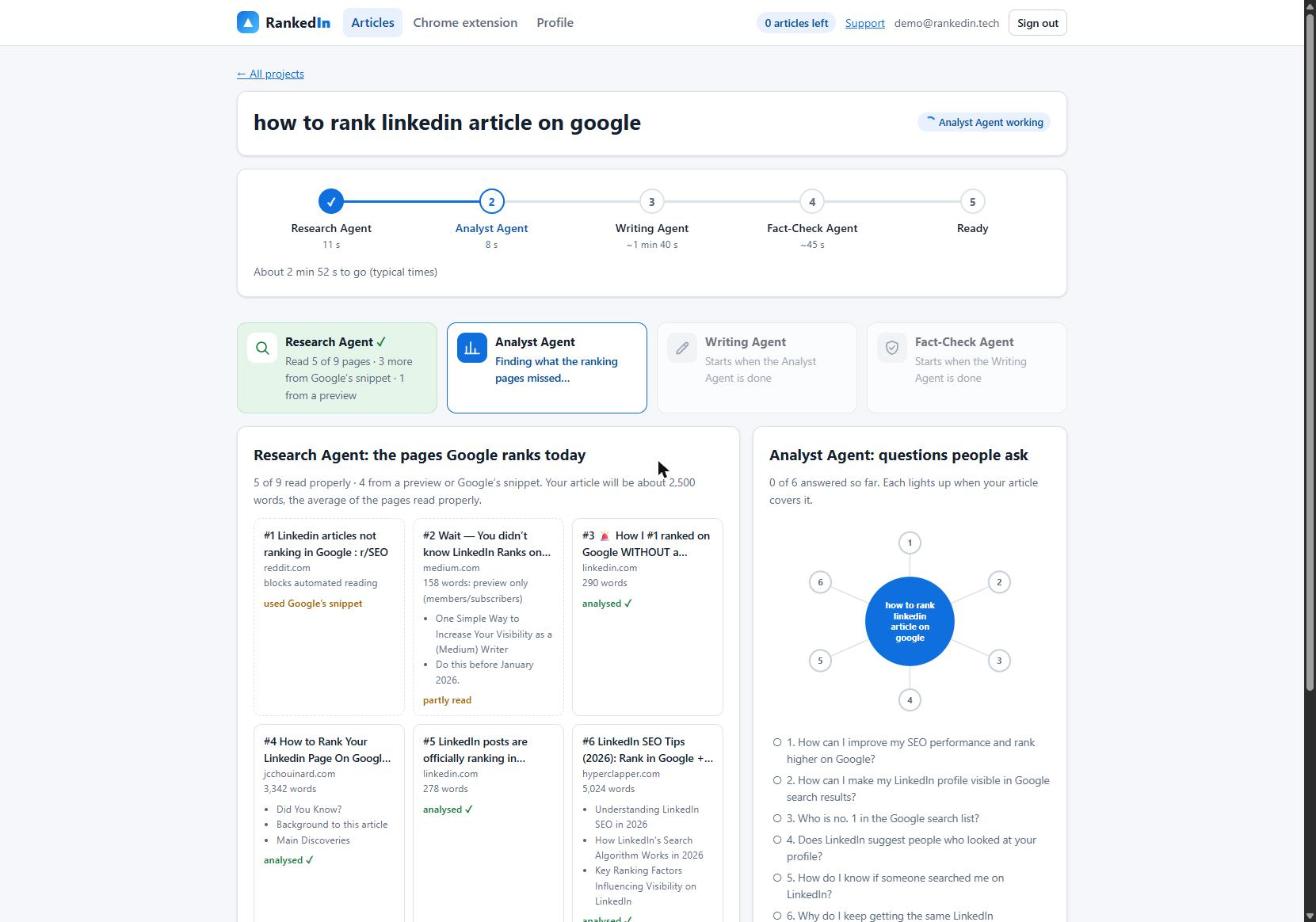
We did a real run on 23 October 2026 for "how to rank linkedin article on google" (Google United States). Research took 11 seconds, analysis took 15 seconds, and writing took 1 minute 13 seconds, producing 2,608 words. The whole run, including fact-checking, took 1 minute 51 seconds. For a full walkthrough, see our guide to using an AI tool to write LinkedIn articles for SEO.
Notice what the draft is based on: the pages that actually rank and the questions people actually ask. That separates a researched draft from a generic post typed from a prompt. If you are comparing tools, here is what to look for in a LinkedIn article generator.
Where AI Needs Guardrails: Fact-Checking Against Sources
AI models can state wrong things confidently, which Good2bSocial calls "hallucinations". A draft should never go out unchecked. Our Fact-Check Agent works like this:
- It lists up to 25 factual claims from the article.
- It checks each claim against the research gathered earlier.
- It applies corrections only and never rewrites the article.
- It re-checks the corrected sentences.
- If anything important is still wrong, it marks the article "Needs review" instead of "Ready".
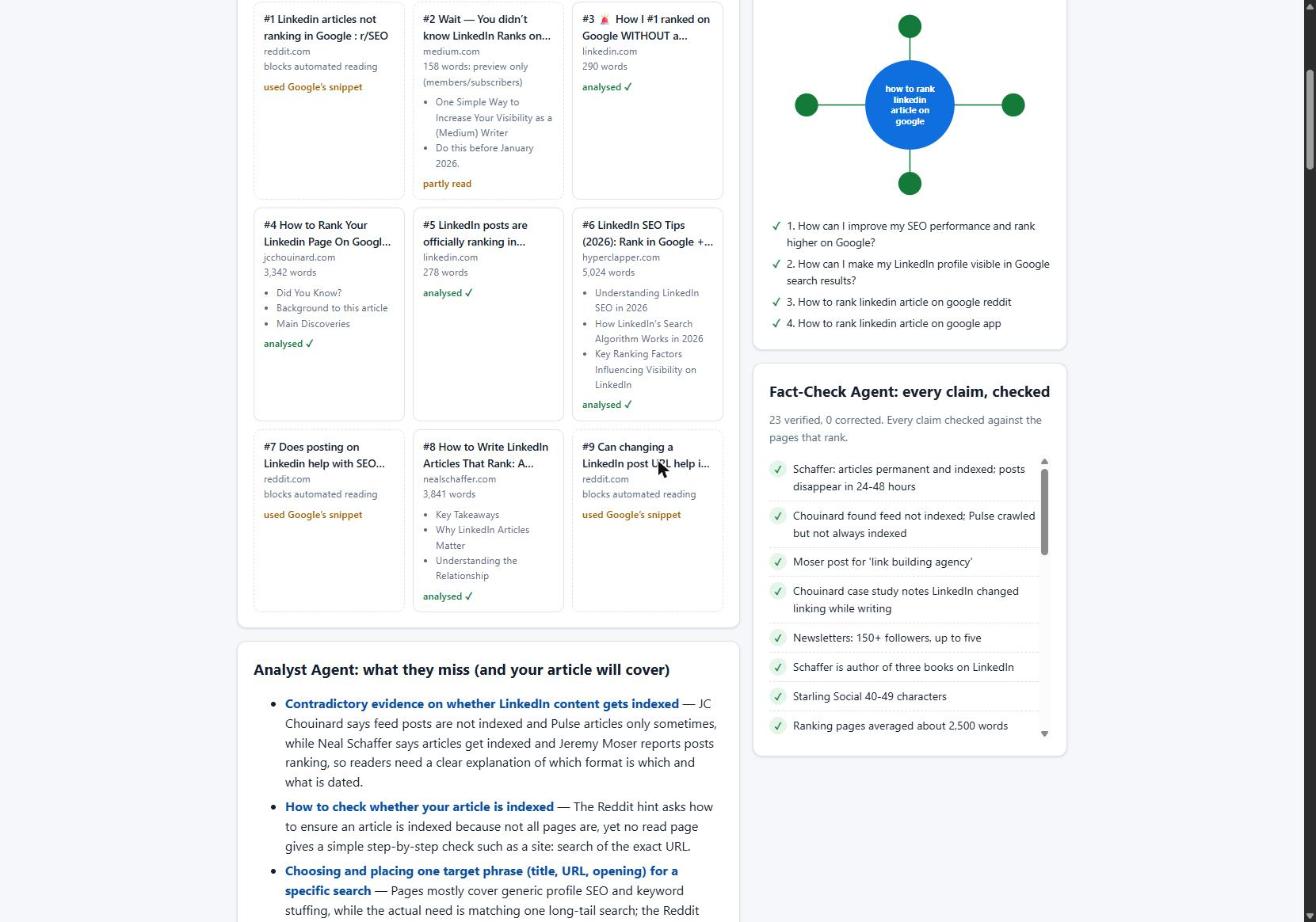
In the run above, it checked 23 claims and corrected 0.
This check has limits. It confirms that a claim matches the research. It cannot tell you whether the sources themselves are right, and it cannot judge whether your opinions and advice suit your audience. Those judgements are the human's job.
The Human Steps: Reading the Draft and Clicking Publish
Our Chrome extension opens LinkedIn's article editor and fills it in. That includes the title, the article with LinkedIn's own Heading and Subheading styles, the cover image, the search term as the cover caption, and the business details. After the customer clicks "Next", it also fills in the feed post that announces the article.
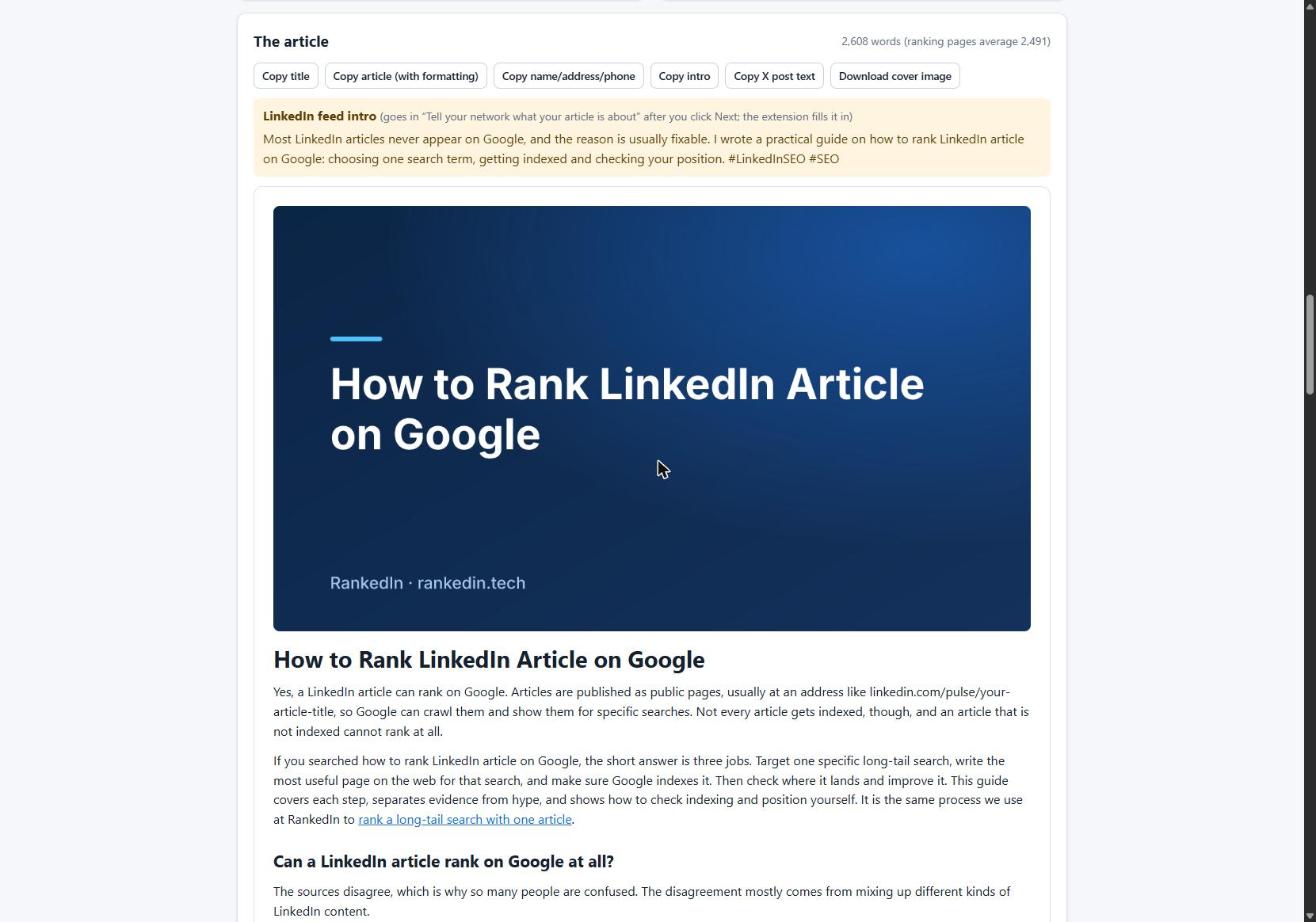
Then the extension stops. The customer reads the article and clicks Publish themselves, because RankedIn never publishes for them. Afterwards, X opens with a ready post linking to the article, and again the customer clicks Post.
This is the point to follow LinkedIn's own advice to "be more human". Before you publish, check these points:
- Does it sound like you? Add an example from your own work.
- Did you enjoy reading it? Roth suggests asking authors exactly that.
- Would you stand behind every claim if a client asked about it?
- Does the link go where you want readers to go?
Practical Safety Limits and Formatting Pitfalls
High volume is what filled LinkedIn's feed with slop, so we cap it. Each customer can create at most 3 new articles a day, to keep their LinkedIn account safe. The first article is free. Customers can also save up to 20 search terms in "My terms" and write about them later, which supports a steady pace instead of a burst.
Formatting needs checking too. We found that line breaks between blocks of pasted HTML made LinkedIn's editor insert empty paragraphs. A 12-block article became 23 blocks, and 11 of them were empty.
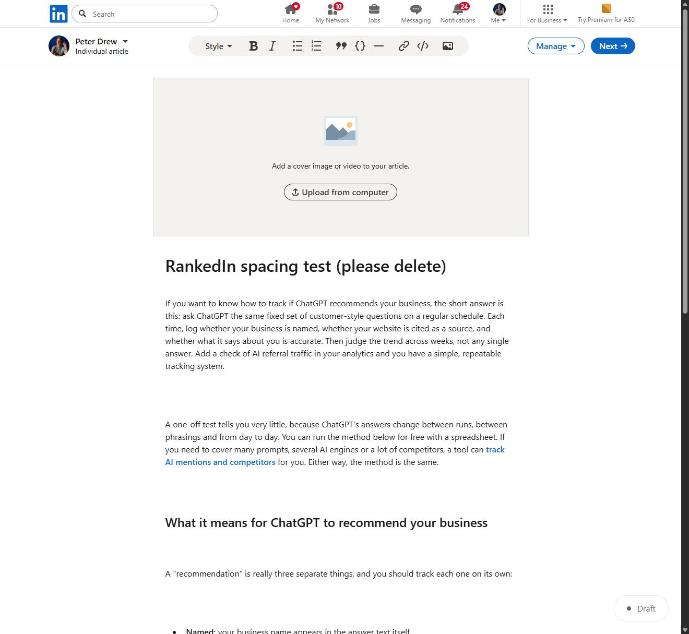
Sending compact HTML fixed the problem, and 12 blocks now stay 12. The lesson applies to any AI-assisted workflow: check the output where readers will see it, not only inside the tool.
Indexing and Honest Expectations After Publishing
After publishing, the LinkedIn article link and the X post link are sent together to PetesIndexer, the indexing service we use. RankedIn shows a link as indexed only when PetesIndexer confirms that Google has indexed it. Until then, the status reads "Submitted, indexing in progress". Indexing is not guaranteed. If a link is not indexed, it is sent again once automatically. Our guide to how indexing works for LinkedIn articles covers this in detail.
To see where it shows up, use the Test Now link next to the project in RankedIn: it opens that exact Google search in the project’s country.
Is it worth the effort? We did keyword research on 23 October 2026 covering 17 searches about ranking or indexing LinkedIn articles (Google United States). A linkedin.com/pulse article was in the live top 10 for 13 of the 17. Most of those searches are small, at around 10 a month.
We apply the same honesty to our own results. On 23 October 2026 we published four articles written with RankedIn, including How to Rank a LinkedIn Article and How To Reverse Engineer AI Overviews. That day they had been submitted to PetesIndexer, indexing was in progress, and none was in Google's top 100 yet, which is expected this early. Rankings are never guaranteed. What you can control is a well-researched, fact-checked article that a human has read and chosen to publish.
Frequently asked questions
Does LinkedIn allow AI-generated content?
The sources we reviewed show no ban on AI-assisted writing. However, LinkedIn limits the reach of content its systems classify as low-quality AI. Such posts are less likely to be shown beyond the author's direct connections, and LinkedIn reported a 40% decline in views of content classified as AI slop. Content you edit and personalise is treated differently from generic output.
Why is there so much AI content on LinkedIn?
AI made it cheap to produce large volumes of polished-looking text. A July report from Pangram found that more than 40% of long-form LinkedIn posts were AI-generated, compared with around 30% on X and Medium. Much of this content follows the same pattern of hooks, bullet lists and emojis.
What is the controversy surrounding LinkedIn's AI?
According to CNN, LinkedIn became the subject of internet jokes over bland AI-written posts, so it added a button for flagging "AI slop". That button was clicked over 1 million times in two weeks. CNN also notes an irony: LinkedIn is owned by Microsoft, which has pushed people to adopt its AI tools for everything from writing to coding, and LinkedIn itself previously offered AI rewrite tools before scaling them back.
What are 7 human skills that AI cannot replace?
The research we used does not support a definitive list of seven. BCG's LinkedIn article argues that humans bring creativity, judgement, empathy and ethics, while AI handles large amounts of data. That is an opinion, but it matches our view: the human should own the ideas, the final check and the decision to publish.
What are the top 10 best articles on artificial intelligence?
There is no agreed top 10. On LinkedIn, the ranking results for this search include BCG's article on how AI is reshaping everything, a generative AI newsletter, and LinkedIn's Talent blog on AI in hiring. For news about LinkedIn and AI itself, CNN's report on LinkedIn fighting AI-written posts is a useful starting point.