LinkedIn Article Writer
Published · Updated · By the RankedIn team
A LinkedIn article writer is whoever, or whatever, produces the long-form article you publish on LinkedIn. That can be a person you hire, an AI tool, or a service like RankedIn that writes each article for one specific Google search. If you want the article to keep finding readers after the feed has moved on, the writer you choose has to do more than produce readable text.
This guide gives you six checks to judge any writer on. These are the checks that decide whether an article can rank on Google, and we show each one on our own workflow at RankedIn. Use them whether you hire a person, pay for a tool or write the article yourself.
What a LinkedIn article writer is (and isn't)
The Google results for this search mix how-to guides, AI tools, a company page and a video, so it helps to separate the three kinds of writer first:
- A person. A freelance writer or ghostwriter who learns your views and drafts in your name. This is also what people mean when they search for “LinkedIn article writer jobs”: paid work writing articles for other people's profiles.
- An AI tool. Software that drafts text from a prompt or from your past posts. Many tools sold for LinkedIn, such as RedactAI and ContentIn, focus on short feed posts rather than long articles.
- A service built around search. RankedIn starts from a Google search term and produces a LinkedIn article built to rank for it.
Two things a LinkedIn article writer is not. It is not a feed-post generator: a post is a short update, while an article is a long piece with its own page. Filestage puts the article character limit at 110,000. And it is not WRITER, the San Francisco company that ranks for this search. Founded in 2020, WRITER sells an enterprise AI platform where companies build and supervise AI agents grounded in their own data, using WRITER's own language models.
Anyone with a LinkedIn account can write an article. To put one on LinkedIn, go to your homepage (not your profile), click Write article, add a headline, write or paste the body, add images, click Publish, and share it to your feed when LinkedIn prompts you.
Why ranking on Google is the test that matters
Both Filestage and Podawaa point out that LinkedIn articles can appear in Google search, not only inside LinkedIn. Our own keyword research backs this up. On 23 October 2026 we checked 17 Google United States searches about ranking or indexing LinkedIn articles. A linkedin.com/pulse article was in the live top 10 for 13 of them, and at number 1 for 4 (all four held by the same article, “Does Google index LinkedIn articles?” by Look Left Marketing).
A feed post has a shorter lifespan than an article. An article that ranks keeps meeting people who are actively searching for what you know. That makes Google ranking a fair test of any writer, and it gives us the checklist below.
Check 1: Does it start from one exact search term?
A writer aiming for Google should be able to tell you which search the article is for, and the title should match it. Writing “about LinkedIn” is not a target. A specific, longer phrase that real people type is.
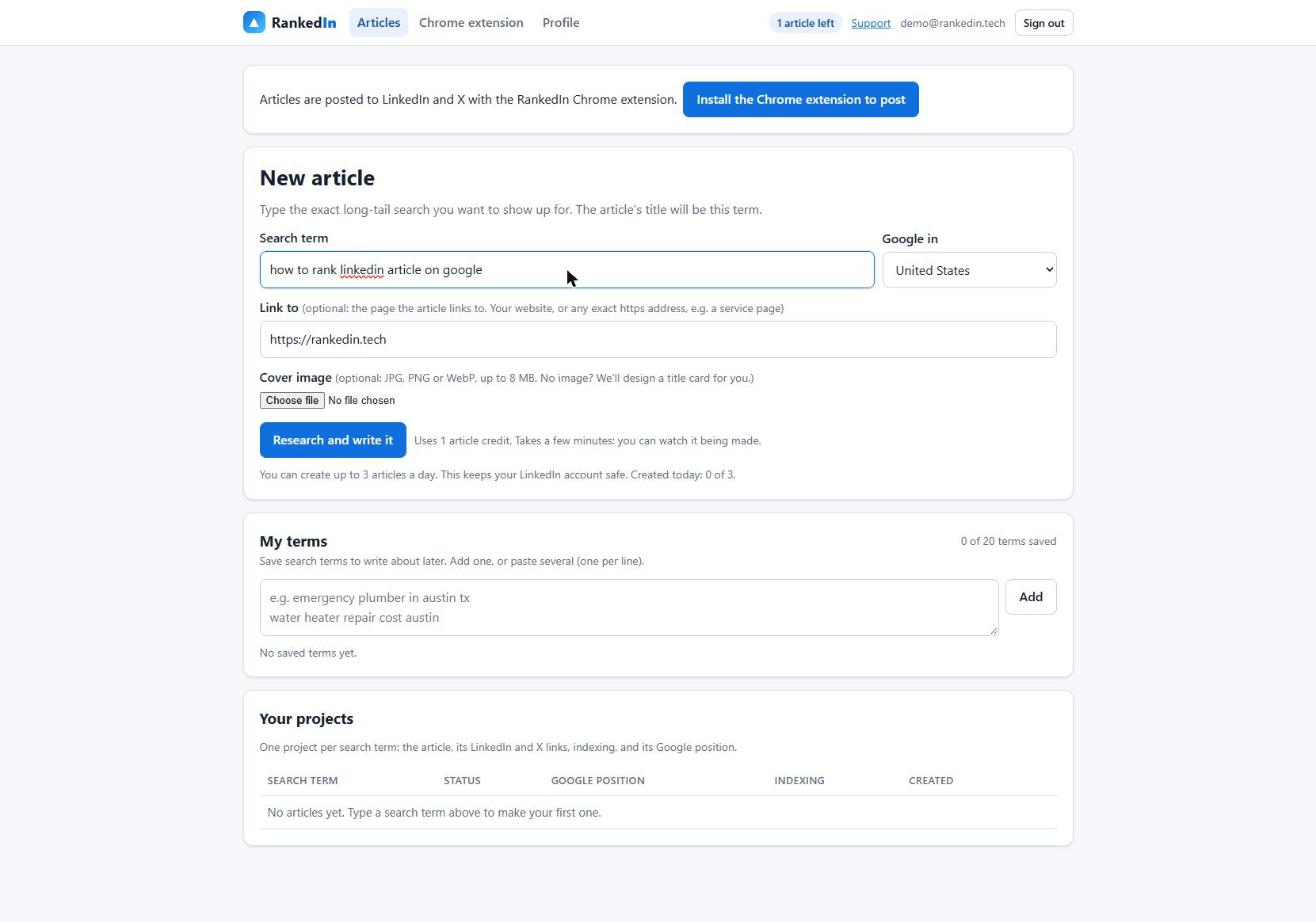
RankedIn makes this the first step. You type the term, pick the Google country, and optionally choose a “Link to” page (your website by default) and a cover image. The title is the exact term in Title Case, which is why this page is called “LinkedIn Article Writer”.
Long-tail terms are often small. Most of the 17 searches in our research get about 10 searches a month, while “linkedin article writer” gets about 260. Small terms are not a problem: they are specific, and specific searches are where a single good article can stand out.
Ask any writer: “Which exact search is this article for, and does the title use it?”
Check 2: Does it study what already ranks?
Advice on length is contradictory. Filestage says articles tend to perform better at 1,500 to 2,000 words. Podawaa says to stick to 500 to 750. Neither ties the number to a specific search, and the right length for one term can be wrong for another.
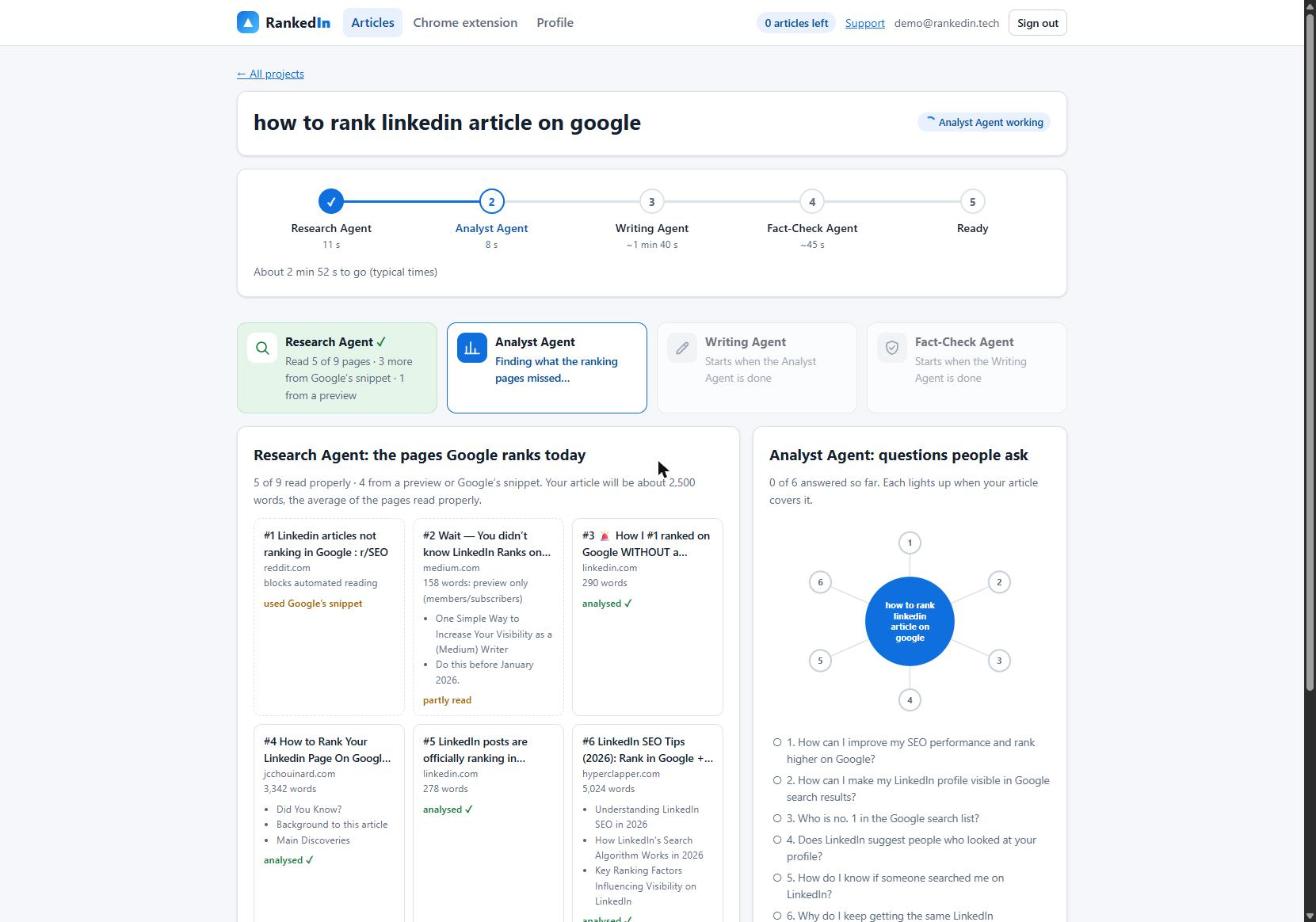
A better method is to read what currently ranks and benchmark against it. RankedIn's Research Agent fetches Google's live top 10 for the term and reads every ranking page at the same time. Pages that block automated reading, such as Reddit, are covered with Google's own snippet. The target length is the average of the pages read properly, kept between 1,200 and 3,000 words.
For this very term, the top 9 results averaged 1,851 words across the 6 pages read properly (one more was a partial preview, two were snippets only). In a separate run for “how to rank linkedin article on google”, the agent took 11 seconds, read 5 of 9 pages properly and set a target of about 2,500 words. Our guide on how long a LinkedIn article should be goes deeper on word count.
Ask any writer: “Which pages rank for this term today, and how did you decide the length?”
Check 3: Does it find what the ranking pages miss?
Copying the top results produces a page Google already has. A useful article covers what they leave out and answers the questions people ask.
This search is a good example. The top results teach you to write an article yourself or sell a tool, but none give a buyer criteria for choosing a writer. That gap is the reason this page exists.
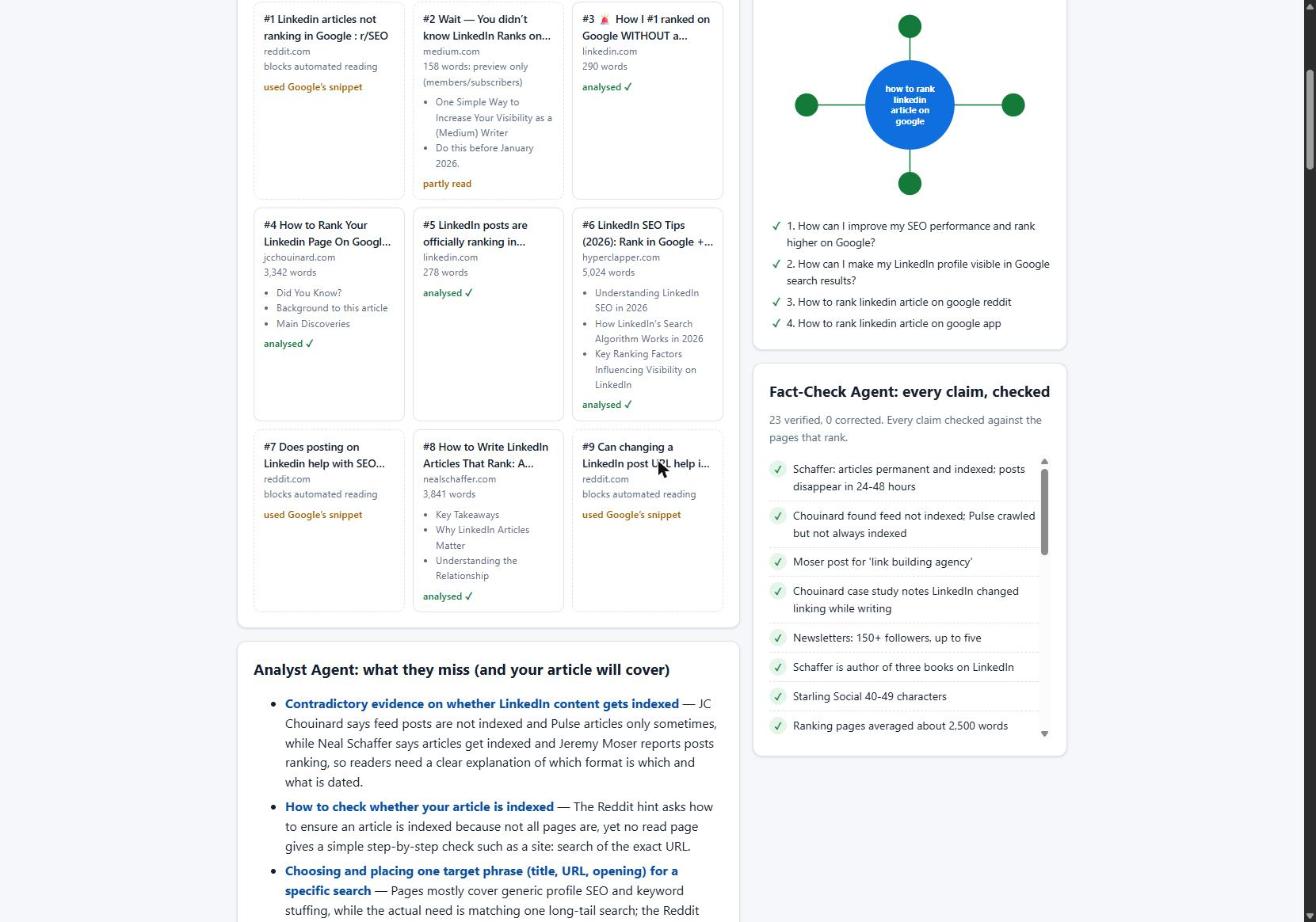
RankedIn's Analyst Agent does this step: it finds the gaps, picks the People Also Ask questions to answer and builds an outline. In the run above it took 15 seconds and found 6 gaps and 4 questions. The Writing Agent then writes the article live, adds one natural link to your “Link to” page and builds an FAQ from Google's People Also Ask questions.
Ask any writer: “What do the current top results miss, and which questions will this article answer?”
Check 4: Are the facts checked?
AI drafts can state wrong numbers in a confident tone, and human writers make mistakes too. Even the ranking pages for this term disagree with each other on basics like length. An article in your name with a wrong statistic costs you trust with exactly the readers you want.
RankedIn's Fact-Check Agent lists up to 25 factual claims in the article and checks each one against the research. It applies corrections only (it never rewrites the article) and then re-checks the corrected sentences. If something important is still wrong, the article is marked “Needs review” instead of “Ready”. In our real run it checked 23 claims and corrected 0, in 11 seconds. All four agents together took 1 minute 51 seconds.
Ask any writer: “Where does each number in this article come from?”
Check 5: Does it publish cleanly and leave you in control?
Formatting matters on LinkedIn, because many readers are on the mobile app. Headings should use LinkedIn's own styles, and the spacing should look like an article typed by hand.
We learned this the hard way. When we pasted HTML with line breaks between blocks, LinkedIn's editor inserted empty paragraphs: a 12-block article became 23 blocks, 11 of them empty. Sending compact HTML fixed it, and 12 blocks now stay 12.
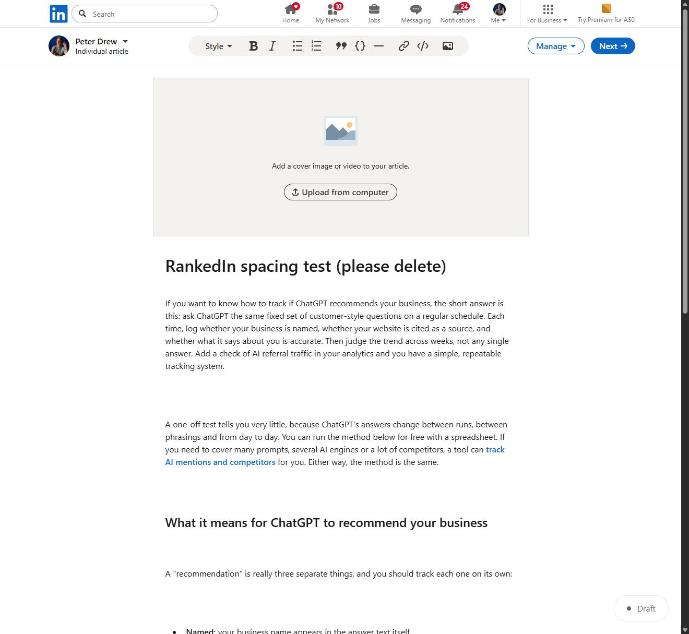
RankedIn's Chrome extension opens LinkedIn's article editor and fills in the title, the article (with LinkedIn's Heading and Subheading styles), the cover image, the search term as the cover caption and your business details. After you click “Next”, it fills in the feed post that announces the article. Then you read it and click Publish yourself. RankedIn never publishes for you. Afterwards X opens with a post ready that links to the article, and you click Post.
Some tools schedule and publish automatically, which is convenient for short posts. For a long article in your name, reading it before it goes live is worth the minute. RankedIn also limits each customer to 3 new articles a day to keep their LinkedIn account safe.
Ask any writer: “Who clicks Publish, and will the formatting survive LinkedIn's editor?”
Check 6: Does it help with indexing and tell you the truth about results?
An article can only rank once Google has indexed it, and that is never guaranteed. No writer, person or tool, can promise rankings. Even RedactAI's own FAQ says no one can guarantee a post will go viral. Treat any guarantee as a warning sign.
What a good writer can do is help and report honestly. After you publish, RankedIn sends the LinkedIn article link and the X post link together to PetesIndexer. A link shows as indexed only when PetesIndexer confirms Google has indexed it; until then it says “Submitted, indexing in progress”. A link that is not indexed is sent again once automatically. Our explainer on whether LinkedIn articles are indexed by Google shows how to check yours step by step.
Here is our own status, plainly. We published four LinkedIn articles written with RankedIn on 23 October 2026, including How to Rank a LinkedIn Article and The Best AI Overviews MCP. That same day all four were submitted to PetesIndexer with indexing in progress, and none was in Google's top 100 yet. That is expected so early.
Person, AI tool or RankedIn: how to choose
Run each option through the six checks:
- A human writer or ghostwriter is still the better choice when the article depends on interviews, your personal stories or a sensitive topic where judgement matters more than speed. Ask them checks 1 to 6 directly; a good one will have answers.
- A general chatbot drafts quickly, but it does not read the current top 10 for your term unless you do that work for it. Checks 2, 3 and 4 fall on you.
- Post generators like RedactAI (which learns from your last 100 posts) and ContentIn (which trains on at least 20 of your posts) are built for voice-matching and a steady rhythm of feed posts, not long-form articles aimed at a search term.
- RankedIn covers all six checks for one search term at a time. You still bring the review, and your expertise is what makes the article worth reading.
If you are comparing tools specifically, our guide to what to look for in a LinkedIn article generator adds more detail. Whichever writer you pick, hold it to the same standard: one exact term, real research, gaps filled, facts checked, you in control, and honest reporting.
Frequently asked questions
How do I put an article on LinkedIn?
Go to your LinkedIn homepage (not your profile page) and click Write article to open the publishing tool. Add a headline, write or paste your article, add images, then click Publish and share it to your feed when prompted. RankedIn's Chrome extension fills in the editor for you, but you still review it and click Publish yourself.
Can anyone write a LinkedIn article?
Yes. Anyone with a LinkedIn account can write and publish an article from their homepage. Whether it reaches readers through Google depends on choosing a specific search term, matching what already ranks and getting indexed, which is never guaranteed.
Which AI is the best for LinkedIn?
It depends on what you are writing. Tools like RedactAI and ContentIn focus on short feed posts that match your voice, while a general chatbot gives quick drafts without live search research. For long articles meant to rank on Google, look for an app or software that targets one search term, studies the current top results and checks its facts.
Can ChatGPT Write my LinkedIn profile?
A general chatbot like ChatGPT can draft profile sections such as your headline and About summary, but it only knows what you tell it, so edit the draft until it is accurate and sounds like you. Writing a profile is a different job from writing an article that ranks for a Google search.
What does the writer company do?
WRITER is a San Francisco software company founded in 2020. It sells an enterprise AI platform where teams build, run and supervise AI agents grounded in their company's data, using WRITER's own language models. It is not a LinkedIn article writing service, even though its LinkedIn page ranks for this search.
Is there a LinkedIn article writer app I can try for free?
RankedIn turns a search term into a LinkedIn article built to rank for it, with research, writing and fact-checking done by four AI agents. Your first article is free. You can start at rankedin.tech.