LinkedIn Pulse SEO
Published · Updated · By the RankedIn team
LinkedIn Pulse SEO is the work of getting a LinkedIn article, the kind that lives at a linkedin.com/pulse/ address, to show up in Google. Pulse articles can and do rank, but only some of what you do in LinkedIn's editor affects that.
You control the title, which also becomes the address. You also control the headings, the body, the cover image and its caption, and one link out. You do not control the domain or the page template. Below we explain what "Pulse" means now, take apart a real Pulse address, and go through each on-page element using our own published articles. We finish with indexing and tracking, because publishing is not the same as being indexed.
What Pulse Means in 2026
The name has had three lives:
- A news app. Pulse started as a standalone news aggregation app, which LinkedIn bought.
- A publishing platform. In February 2014 LinkedIn opened its publishing platform to the public, so any member could write long-form posts.
- Today's article editor. You now start the same thing by clicking "Write article". As Kerry Baker points out, LinkedIn no longer leans on the Pulse branding much.
The address is what stayed. LinkedIn articles still live under linkedin.com/pulse/, and that is the page Google crawls, indexes and shows in results. So when people say "Pulse article" today, they mean a LinkedIn article.
A Pulse article and a feed post differ in purpose and lifespan. Posts are made for quick reading in the feed and fade once they scroll away. Articles get their own page and stay attached to your profile. Two of the ranking guides give a limit of 125,000 characters for an article and 1,300 for a feed post. Those guides are a few years old, so check the current editor.
Do Pulse Articles Actually Rank on Google?
Often, yes, for small and specific searches. On 23 October 2026 we checked 17 Google United States searches about ranking or indexing LinkedIn articles. A linkedin.com/pulse article was in the live top 10 for 13 of them and at number 1 for 4.
All four number-one spots belonged to the same article, "Does Google index LinkedIn articles?" by Look Left Marketing. Most of those searches are small, about 10 a month. The largest, "linkedin article writer", has about 260.
An independent test points the same way. The author of SEO Riddler copied a course page into a Pulse article. The article reached 12th for "python for SEO", a keyword with about 10 searches a month, and the original page still ranked 9th. The same author adds two caveats:
- Pulse visibility in Google appears to have risen for a year or so between 2023 and 2024; the author questions whether it is down or just returning to normal.
- Google's spam policies treat hosting content elsewhere purely to manipulate rankings as abuse, although editorial articles are not counted as abuse.
So Pulse articles can rank, especially for long-tail terms, but nobody can guarantee a ranking, and the platform's visibility changes over time. We go deeper in our evidence-first answer on whether LinkedIn articles rank on Google.
Anatomy of a Pulse URL
Take one of our own articles: linkedin.com/pulse/how-rank-linkedin-article-peter-drew-msvqc/. The address has four parts:
- /pulse/: the path all LinkedIn articles share.
- how-rank-linkedin-article: the slug, built from the title "How to Rank a LinkedIn Article". The short words "to" and "a" were dropped.
- peter-drew: the author's name.
- msvqc: a short code added at the end.
Our other titles follow the same pattern. "The Best AI Overviews MCP" became best-ai-overviews-mcp, and "How To Reverse Engineer AI Overviews" became how-reverse-engineer-ai-overviews.
You do not type the address yourself; LinkedIn generates it from the title. Your title is effectively your slug, so the words you choose for the title are the words in your URL.
Writing the Title for Search
Use the exact search term as the title, in Title Case. The term then appears in the page title and, apart from a few small words, in the address. Every RankedIn article works this way. Two examples are "How to Rank a LinkedIn Article" and "AI Overviews MCP for ChatGPT".
The title has a second job. When you publish, your connections get a notification, and the ranking guides agree the title is what they see in it. A search-term title still has to read like something a person would want to open. Keep it short, plain and specific.
Headings and Body Structure in LinkedIn's Editor
LinkedIn's article editor has its own Heading and Subheading styles. Use them for your sections instead of bold text, so your structure is made of real headings and not just text that looks bigger. RankedIn's Chrome extension fills the article in with these styles for that reason.
- One topic. Cover one question and answer it early.
- An FAQ. Answer the People Also Ask questions for your term in a short FAQ near the end.
- A natural length. Sources disagree here. One ranking guide suggests staying under 1,000 words so readers finish. RankedIn sets its target from the average length of the pages that rank for the term, kept between 1,200 and 3,000 words.
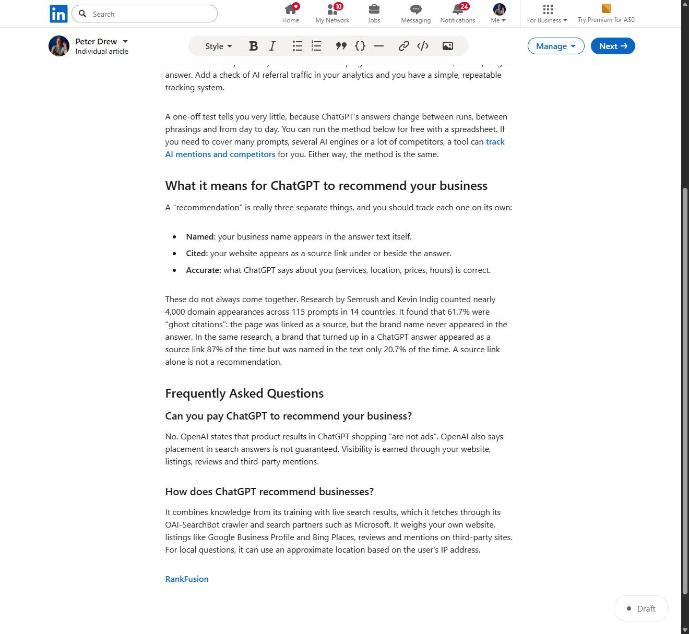
A warning about pasting: we found that line breaks between blocks of pasted HTML made LinkedIn's editor insert empty paragraphs. A 12-block article became 23 blocks, 11 of them empty.
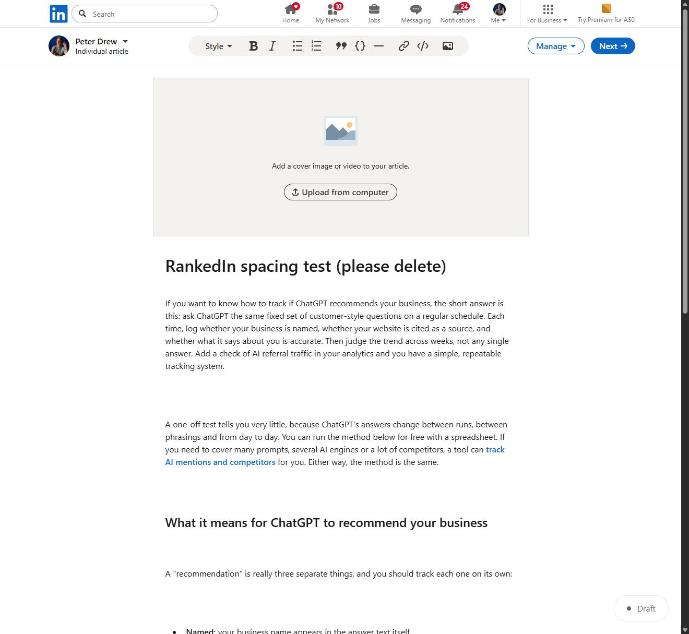
Sending compact HTML fixed it, and 12 blocks stayed 12. If you paste from another tool, look for stray empty lines before you publish.
Cover Image and Caption
The cover image sits at the top of the article and is the first thing a reader sees, so it helps people decide whether to keep reading. Older guides quote pixel sizes from the 2015-era editor. Check the preview in today's editor rather than relying on those numbers.
You have two options:
- Upload your own image.
- Use a designed title card that shows the title. RankedIn designs one if you do not supply a cover.
Whichever you choose, add a caption. We use the search term itself as the cover caption. That gives the term one more place in plain text near the top of the page.
Links, Hashtags and What Doesn't Matter Much
Add one natural link to the page you want readers to visit, usually your website or a specific service page. RankedIn adds exactly one link, to the customer's "Link to" page. A single relevant link reads as help; a pile of links reads as an advert.
Hashtags are a feed tool. One ranking guide suggests 3 to 5 relevant hashtags in posts and says they can "potentially" boost engagement and reach. None of the pages we read show hashtags affecting Google rankings. None of them define the "3-3-3 hashtag rule" either. Treat any hashtag number as a suggestion, not a rule, and use hashtags on the feed post that announces your article, where feed discovery happens.
Getting the Article Indexed
Publishing puts the article on LinkedIn. It does not mean Google has indexed it yet.
After the customer publishes, RankedIn handles indexing like this:
- RankedIn sends the LinkedIn article link and the X post link together to PetesIndexer.
- The link shows "Submitted, indexing in progress" until PetesIndexer confirms Google has indexed it.
- If a link is not indexed, it is sent again once, automatically.
Indexing is still not guaranteed.
To see where it shows up, use the Test Now link next to the project in RankedIn: it opens that exact Google search in the project’s country. Our own four articles were published on 23 October 2026. They show "Submitted, indexing in progress" and are not in the top 100 yet, which is expected this early. For the full picture, read how Google indexes a LinkedIn article and how to check yours.
A Pulse SEO Checklist and Worked Example
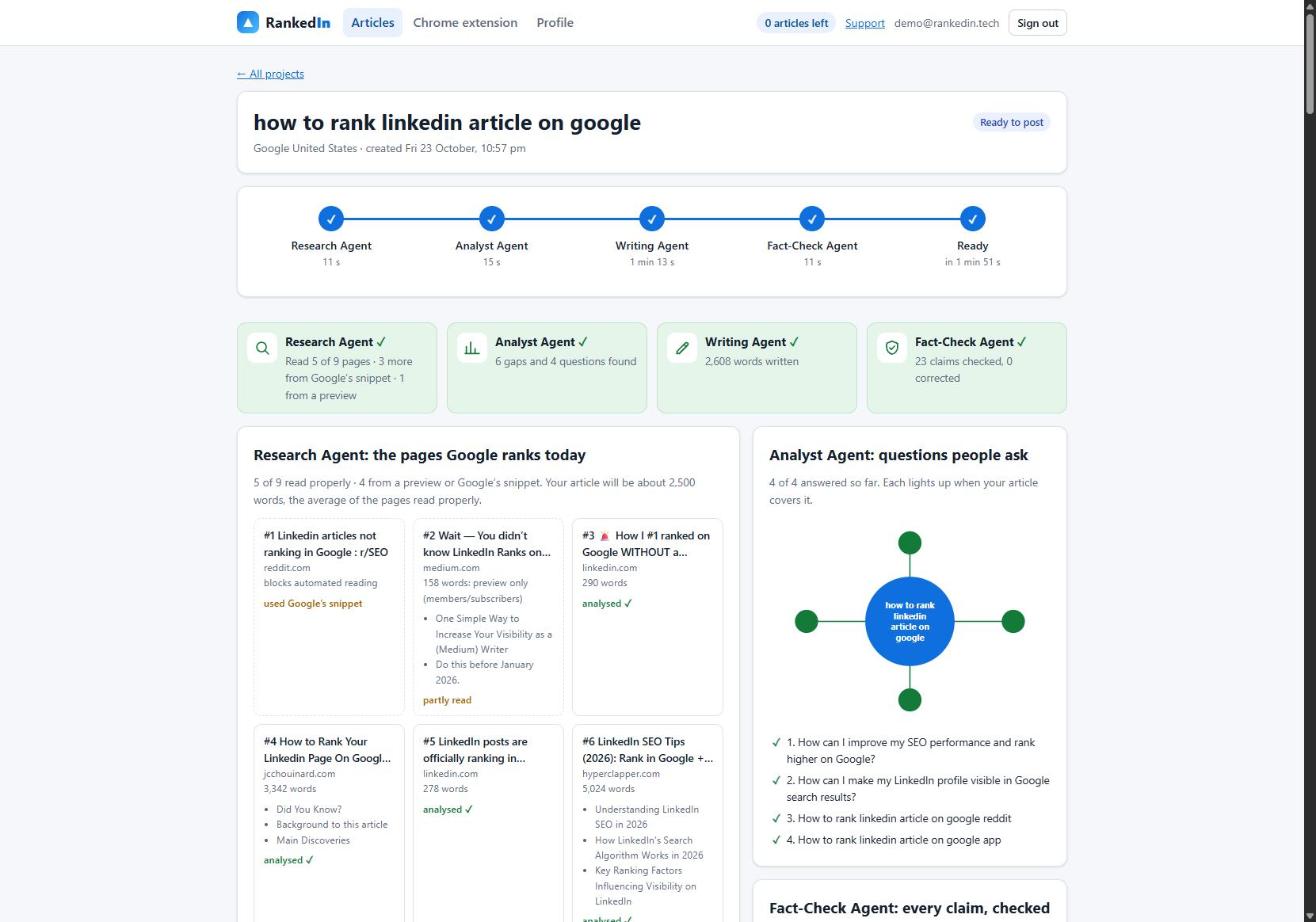
Here is a real RankedIn run from 23 October 2026, for the term "how to rank linkedin article on google" in Google United States. It starts with the search term, the Google country, the "Link to" page and an optional cover.
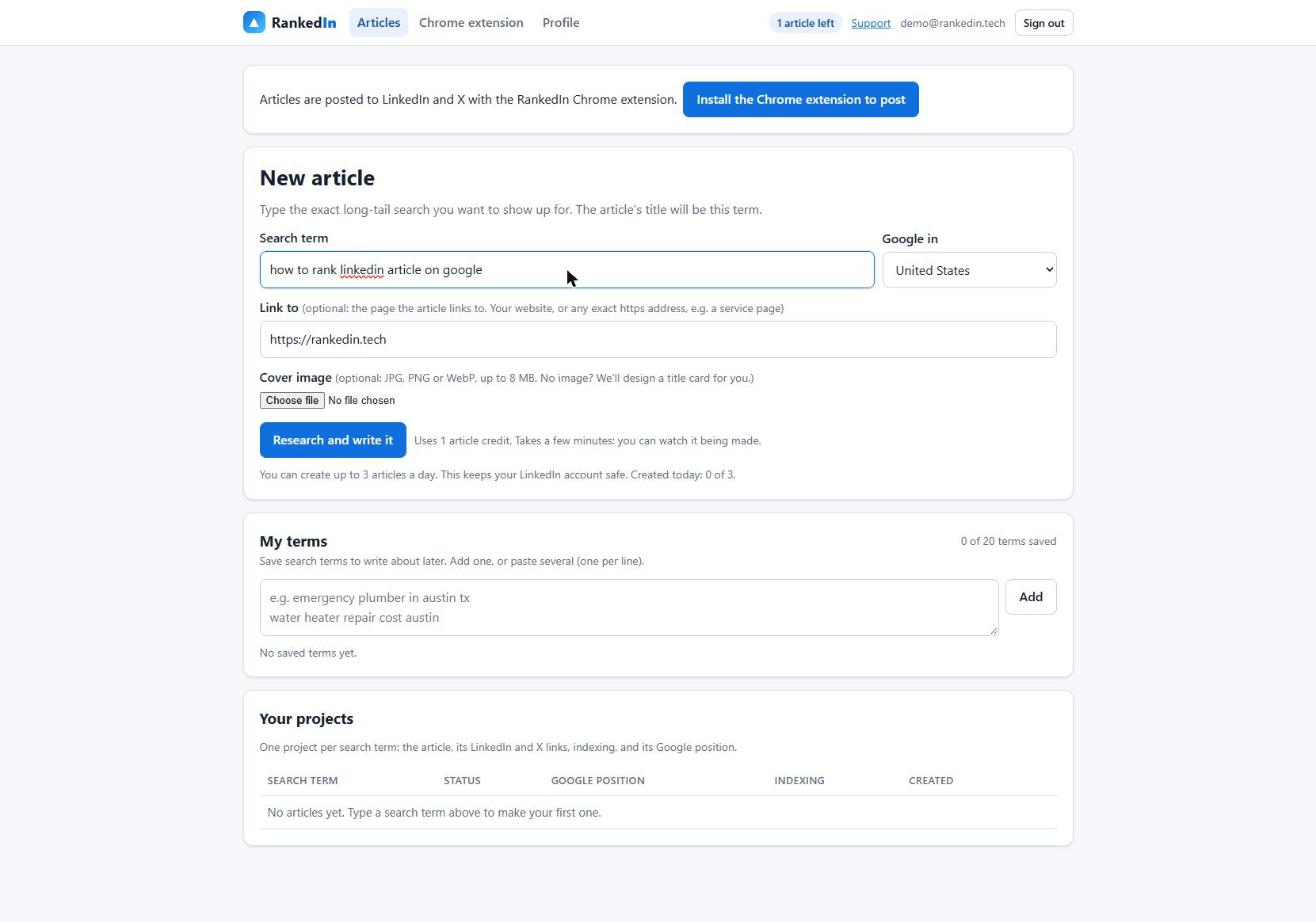
- Research Agent, 11 seconds. It read 5 of 9 ranking pages properly, 3 more from Google's snippet and 1 from a preview, and set a target of about 2,500 words.
- Analyst Agent, 15 seconds. It found 6 gaps and 4 questions.
- Writing Agent, 1 minute 13 seconds. It wrote 2,608 words.
- Fact-Check Agent, 11 seconds. It checked 23 claims and corrected 0.
The whole run took 1 minute 51 seconds.
Next, the Chrome extension opens LinkedIn's article editor on your computer and fills in:
- the title and the article
- the cover and its caption
- your business details
- after you click "Next", the feed post that announces the article
You read it and click Publish yourself; RankedIn never publishes for you. X then opens with a post ready to go.
Use this checklist for any Pulse article:
- Title: the exact search term, in Title Case, still readable.
- Slug: check that the generated address carries the term.
- Headings: LinkedIn's Heading and Subheading styles, and no empty paragraphs.
- Body: one topic, an FAQ from People Also Ask, and a length that matches what ranks.
- Cover and caption: your own image or a title card, with the search term as the caption.
- Link: one natural link to your own page.
- Hashtags: a few relevant ones on the feed post.
- Indexing: submit the link and wait for confirmation.
- Tracking: check the position daily.
For every item mapped to what is filled in automatically and what you still check, see our on-page SEO checklist for a LinkedIn article. Your first RankedIn article is free, and you can create up to 3 a day. As with any method, rankings are never guaranteed.
Frequently asked questions
What is a Pulse article on LinkedIn?
A Pulse article is a long-form article published from your LinkedIn profile with the "Write article" button. It gets its own page at a linkedin.com/pulse/ address and stays on your profile, unlike a feed post that fades from the feed. LinkedIn uses the Pulse name less than it used to, but the address remains.
Is LinkedIn Pulse good for SEO?
It can be, especially for small, specific searches. In our check of 17 Google United States searches about ranking or indexing LinkedIn articles, a Pulse article was in the top 10 for 13 of them. Visibility has moved up and down over the years, and no one can guarantee a ranking.
What is a good LinkedIn Pulse SEO strategy?
Pick one long-tail search term and use it as the title, because LinkedIn builds the address from the title. Structure the article with LinkedIn's Heading and Subheading styles, answer the People Also Ask questions, add a cover with the term as its caption, and include one natural link. Then confirm the article is indexed and track its position.
Are hashtags still relevant on LinkedIn in 2026?
Hashtags can still help people discover content in the feed, and one ranking guide suggests 3 to 5 relevant ones per post. We found no evidence in the ranking pages that hashtags affect Google rankings for an article. Use a few relevant ones on the feed post that announces your article.
What is the 3-3-3 hashtag rule?
None of the pages ranking for this topic define a 3-3-3 hashtag rule, so we can't confirm what it means or whether it works. The only specific advice we found was to use 3 to 5 relevant hashtags in posts. Treat any hashtag formula as a suggestion, not a rule.