SEO for LinkedIn Posts
Published · Updated · By the RankedIn team
SEO for LinkedIn posts mostly comes down to one decision: choosing which piece of content does the ranking. A short feed post can turn up in Google, but it is a thin page with little room to answer a search well. The page built to rank for a search term is a LinkedIn article. The feed post's job is to announce that article, carry the exact search term in its opening line, and send your network to it.
The practical recipe is short. Write one article for one search term. Then write a brief feed intro that uses that exact term naturally, add a few relevant hashtags for discovery inside LinkedIn, post a companion message on X that links to the article, and get the links submitted for indexing. None of this guarantees a ranking, and we say so wherever it matters below. Everything here comes from the pages that currently rank for this term and from our own first-hand work at RankedIn.
Do LinkedIn Posts Rank on Google? What Actually Gets Found
Most guides on this topic mix up two different search engines:
- LinkedIn's own search. This is where profile keywords, headlines, the About section, skills and endorsements matter. Most of the ranking pages for this term (SalesRobot, Octopus CRM, SocialBee, Snov.io) are really about this kind of search.
- Google. This is where a LinkedIn page competes with every other website for a search term.
On the Google side, Alice Xerri makes the key point in her LinkedIn article: LinkedIn is a high-authority domain, so content published there can outrank websites, sometimes even your own. She notes that newsletters and articles are clearly indexable, and that in many cases regular posts and even comments are too. She has seen her own posts appear for keywords she did not realise she was targeting.
"In many cases" is the honest phrase. Here is how the main LinkedIn formats compare for Google:
- Articles (addresses that start with linkedin.com/pulse): long form, with a title, headings and room to answer a question fully. These are the format most likely to rank for a specific search.
- Newsletters: indexable, and they work much like articles.
- Posts: sometimes indexed, but short, with no title and little depth. Indexed is not the same as ranking.
- Profiles: often appear when people search for your name, which is why your headline and About section still matter.
We go into the format differences in more detail in our guide to whether Google indexes LinkedIn posts.
The Article Does the Ranking, the Post Does the Announcing
Think of the two pieces as having separate jobs.
- The article is the page built for the search term. Its title is the term, its headings answer the questions people ask, and it has the length to be useful. 316 Strategy Group notes that LinkedIn articles can run past 100,000 characters, and recommends staying between 1,500 and 3,000 words.
- The feed post is the distribution layer. It reaches your network in the feed, invites early comments, and sends readers to the article. 316 Strategy Group describes posts as the format for shorter updates and immediate engagement.
Our own research shows why the article deserves the effort. On 23 October 2026 we checked 17 Google United States searches about ranking or indexing LinkedIn articles. A linkedin.com/pulse article was in the live top 10 for 13 of the 17, and at number 1 for 4 of them. All four number 1 spots were held by the same article, "Does Google index LinkedIn articles?" by Look Left Marketing. Most of those searches are small, around 10 a month, which is typical of long-tail terms: modest volume, but a realistic chance for a well-built article.
So when people ask about SEO for LinkedIn posts, the most useful answer is usually: put the SEO into the article, and write the post so it supports the article.
How to Write the Feed Intro With Your Exact Search Term
A feed intro that announces an article should be short and specific. Here is the structure we use.
- Open with the exact search term, naturally. Put it in the first line or two, where it appears before the "see more" cut. Write it as a sentence a person would say, not as a tag.
- Say what the reader gets. Two or three concrete things the article covers. Specifics beat excitement.
- Point to the article. Make it clear the full answer is in the article.
- Optionally, end with a question. SocialBee suggests ending text posts with a question or a call to action to invite replies.
- Add a few relevant hashtags at the end (more on these below).
Before and after
Before:
New article out!! So excited to share this one. Go check it out. #SEO #LinkedIn #Marketing #Content #Growth #B2B #Tips #Business #Success
It contains no search term, no promise, and nine hashtags with no clear focus.
After:
SEO for LinkedIn posts works differently from SEO for articles. In my new article I cover which LinkedIn content Google actually shows, why the article (not the post) should carry your search term, and how to write a short feed intro that sends people to it. What has worked for you? #LinkedInTips #SEO #ContentMarketing
The term appears once, in plain language, in the first sentence. The reader knows exactly what the article contains. There are three focused hashtags. That is enough.
What about the "golden hour"?
"Golden hour" is the name people give to the first hour or so after you post. The idea is that early engagement tells LinkedIn your post is worth showing to more people. SalesRobot states that high engagement in the initial window signals quality to the algorithm and boosts reach, but it offers no data to support that. Treat exact timing rules as unproven. The practical version is simple: post when you can stay around to reply to comments. Keep in mind that the golden hour, if it matters at all, affects reach in the LinkedIn feed. It is not a Google ranking factor.
Hashtags: What They Do and What They Don't
What they do: LinkedIn members can follow hashtags, as both Octopus CRM and SalesRobot explain. A relevant hashtag can put your post in front of people who follow that topic but are not in your network. That is discovery inside the LinkedIn feed.
What they don't do: none of the ranking pages show hashtags affecting Google rankings, and we have no evidence that they do. Use them as a LinkedIn tool, not as a Google lever.
How many, and which ones
Snov.io suggests 3 to 5 strategic hashtags and warns against overdoing it. That matches our rule of thumb. To choose them:
- One broad topic tag your audience follows (for example #SEO).
- One narrower tag that matches the article's subject (for example #LinkedInTips).
- One audience or industry tag if it fits (for example #ContentMarketing).
Octopus CRM points out that LinkedIn suggests hashtags when you create a post, and that you can search a hashtag to see the content it pulls in. Do that before you commit. If the recent posts under a tag have nothing to do with your article, skip it.
Which hashtag is trending on LinkedIn?
It changes, so any fixed list goes out of date quickly. Check the hashtags LinkedIn suggests while you write, and search candidate tags to see how active they are. A trending tag that is unrelated to your article will not help the right people find it.
The X Companion Post
After the LinkedIn article and its feed post are live, we also post a short message on X that links to the article. The reason is practical: it creates a second public link pointing to the article, outside LinkedIn, and RankedIn sends the LinkedIn article link and the X post link together to PetesIndexer for indexing. We do not claim an X post improves rankings by itself. It is a cheap, useful extra step.
Word it like a compact version of the feed intro:
- The search term or a close variant, in a natural sentence.
- One line saying what the reader gets.
- The article link.
For example: "SEO for LinkedIn posts: why the article should carry the search term and the post should announce it. Full guide:" followed by the link.
In RankedIn, once the LinkedIn article is published, X opens with this post ready and linking to the article. The customer reads it and clicks Post.
Worked Example: From Search Term to Feed Post
Here is how this works in practice, using our own article How to Rank a LinkedIn Article, published on 23 October 2026.
- Pick the term. In the New article form you type the search term, choose the Google country, and optionally set a "Link to" page (your website by default) and a cover image. Without a cover, RankedIn designs a title card.
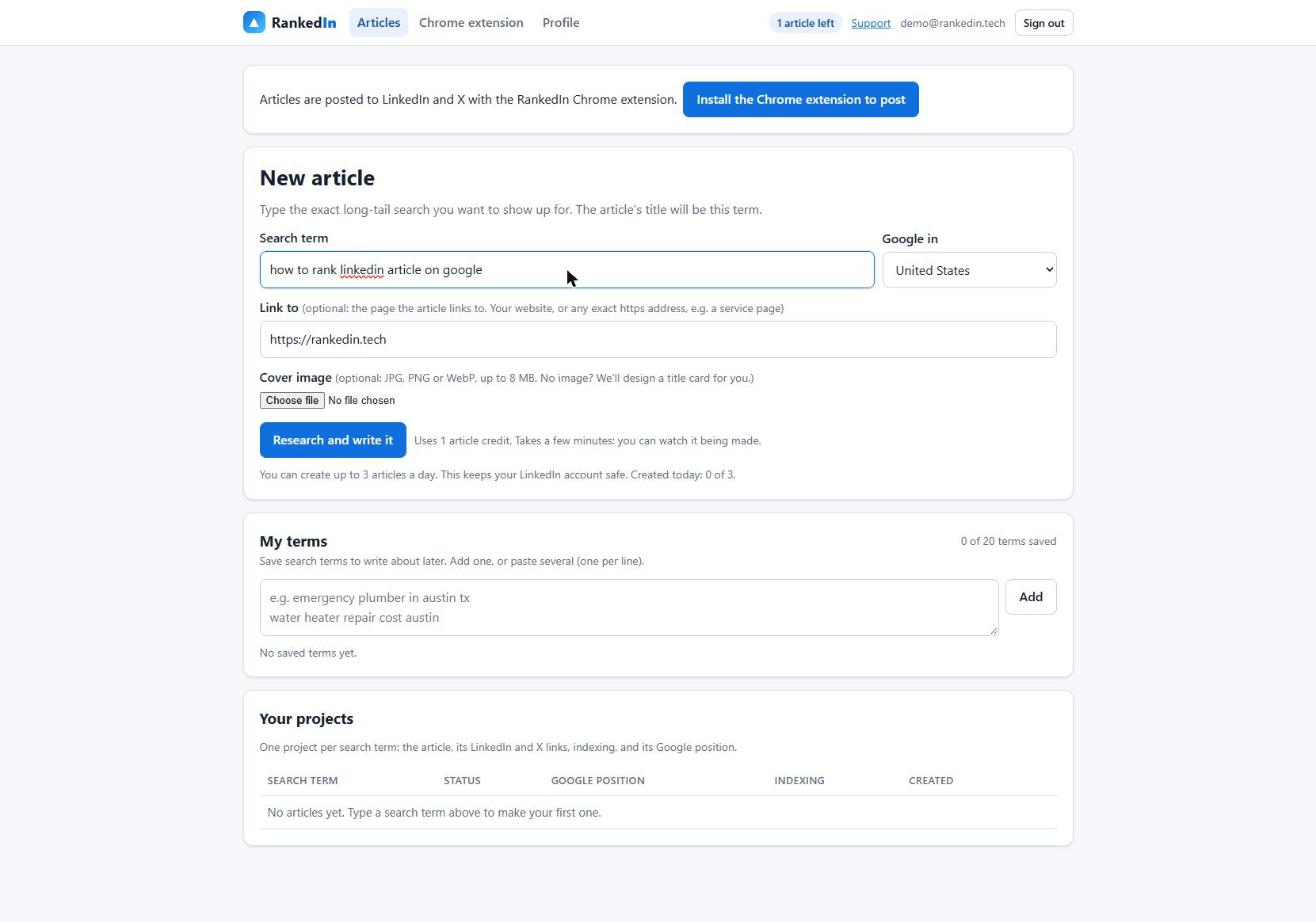
- Four agents build the article. The Research Agent reads the ranking pages, the Analyst Agent finds the gaps and the People Also Ask questions, the Writing Agent writes it (the title is the exact search term in Title Case, with one natural link to the "Link to" page), and the Fact-Check Agent checks up to 25 claims against the research. In a real run for a related term, "how to rank linkedin article on google", the whole process took 1 minute 51 seconds.
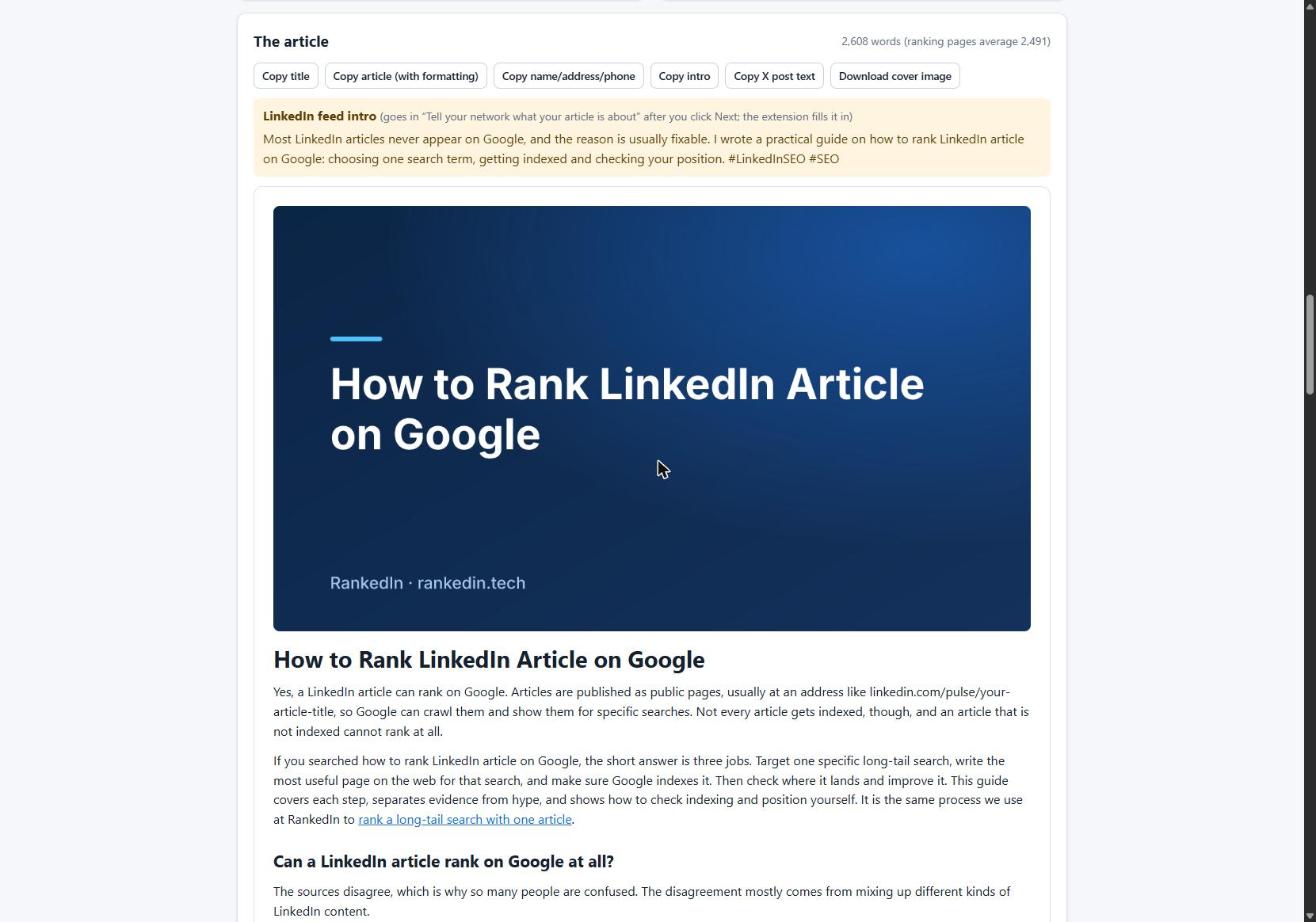
- Review the result. The finished article appears inside RankedIn with its cover, the feed intro for LinkedIn, and copy buttons.
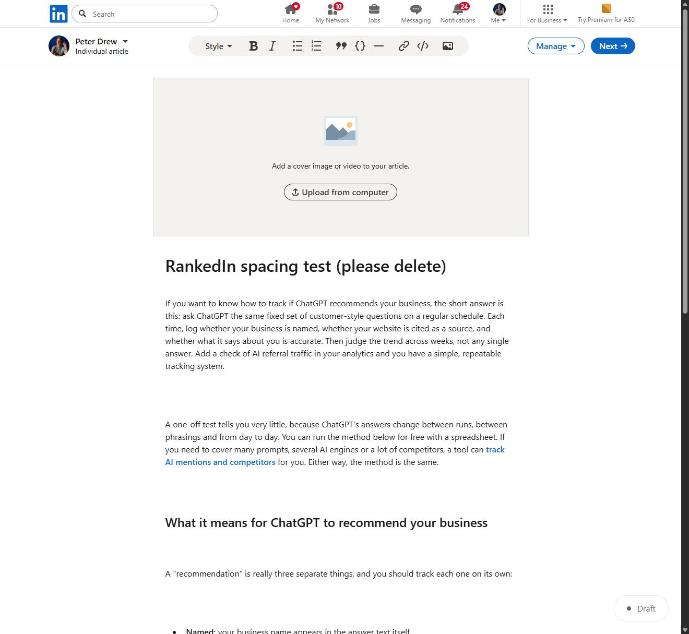
- Post it. The Chrome extension opens LinkedIn's article editor and fills in the title, the article (using LinkedIn's own Heading and Subheading styles), the cover image, the search term as the cover caption, and the business details. After you click "Next", it fills in the feed post that announces the article.
- You publish. You read everything and click Publish yourself. RankedIn never publishes for you. Then X opens with the companion post ready.
The feed intro follows the pattern described earlier: the exact search term in the opening line, what the article covers, then the article itself. RankedIn puts the search term in the title and the cover caption, and the feed intro is built to carry it in its opening line.
One formatting lesson from this workflow: when we first pasted HTML into LinkedIn's editor, line breaks between blocks became empty paragraphs. A 12-block article turned into 23 blocks, 11 of them empty. Sending compact HTML fixed it, so 12 blocks stay 12. If you paste articles in by hand, check the spacing before you publish.
Getting the Link Indexed and Tracking Position
Publishing is not the finish line. Google has to find and index the article before it can rank at all. Here is what happens in RankedIn after you publish:
- The LinkedIn article link and the X post link are sent together to PetesIndexer.
- Until PetesIndexer confirms Google has indexed a link, RankedIn shows "Submitted, indexing in progress". A link is shown as indexed only after that confirmation.
- Indexing is not guaranteed. A link that is not indexed is sent again once, automatically.
- To see where it shows up, use the Test Now link next to the project in RankedIn: it opens that exact Google search in the project’s country.
Here is an honest data point. Our own four articles published on 23 October 2026, including the one above, were all still at "Submitted, indexing in progress" that day and not in Google's top 100. That is expected so early. Rankings are never guaranteed, by us or by anyone else. For the steps to check indexing yourself, see how indexing works for a LinkedIn article.
What to Avoid in LinkedIn Posts That Promote an Article
- Keyword stuffing. Use the search term once in the intro. Octopus CRM, SocialBee and Snov.io all warn against stuffing, and it makes the post read like spam.
- Too many hashtags. Nine generic tags signal nothing. Stick to three to five relevant ones.
- Reposting your blog word for word. 316 Strategy Group advises against republishing blog posts as LinkedIn articles because duplicate content can work against you. They suggest writing LinkedIn-specific content, or posting an excerpt that links back to the original. Alice Xerri is more relaxed about repurposing across your blog and LinkedIn, so the sources differ. Writing something original for LinkedIn is the safe choice.
- Clickbait. If the intro promises something the article does not deliver, readers leave and stop trusting your posts.
- Unsupported promises. Some ranking pages claim doubled traffic in weeks without showing how. Do not make claims in your posts that you cannot back up.
A final note: LinkedIn ads are a separate, paid option. They can buy reach, but they are not SEO and they do not make an article rank in Google. For the on-page side of the article itself, work through our LinkedIn article SEO checklist.
Frequently asked questions
Is it possible to run ads on LinkedIn?
Yes. LinkedIn offers paid advertising, and businesses use it to reach specific professional audiences. Ads are separate from SEO, though: they buy visibility while you pay, but they do not help a LinkedIn article rank in Google's organic results.
Which hashtag is trending on LinkedIn?
It changes constantly, so any list goes out of date quickly. Check the hashtags LinkedIn suggests as you write a post, and search a tag to see how much recent content it pulls in. Choose tags that match your article rather than chasing whatever is trending.
What is the golden hour on LinkedIn?
It is the common name for the first hour or so after you post, when early engagement is said to help a post reach more people in the feed. The ranking pages assert this without data, so treat exact timing rules as unproven. Post when you can reply to comments, and remember it affects LinkedIn feed reach, not Google rankings.
What to avoid posting on LinkedIn?
When a post promotes an article, avoid keyword stuffing, long strings of hashtags, clickbait that the article does not deliver, and claims you cannot support. Also avoid reposting your blog word for word: 316 Strategy Group warns that duplicate content can hurt you, so write for LinkedIn or post an excerpt with a link instead.
What is the best SEO for LinkedIn posts?
Let a LinkedIn article do the ranking, with its title set to the exact search term. Then write a short feed post that uses that term naturally in its first line, says what the reader gets, and adds 3 to 5 relevant hashtags. Add a companion post on X, get the links submitted for indexing, and track the position, knowing that rankings are never guaranteed.